





























icon_build4linux

Cheap Linux VPS Hosting

Host your Linux VPS on the Contabo cloud and experience true open-source flexibility. Take advantage of high speed and reliability at competitive prices, along with quick setup, comprehensive global connectivity, and robust security.
hero-banner_linux-vps

With a range of images and apps available, our Linux VPS caters to users from individual to enterprise level. Choose a sample config below, or mix and match resources with the distribution of your choice to find the perfect fit for your project.

CLOUD VPS 4

Ubuntu

€5.50
4
40 / month
✔️
4 vCPU Cores
8 GB RAM
100 GB SSD More storage available
1 Snapshot
200 Mbit/s Port
Unlimited Traffic*
CLOUD VPS 6

Rhel

€7.50
6
00 / month
✔️
6 vCPU Cores
12 GB RAM
200 GB SSD More storage available
2 Snapshots
300 Mbit/s Port
Unlimited Traffic*
CLOUD VPS 8

Debian

€14.00
11
20 / month
✔️
8 vCPU Cores
24 GB RAM
300 GB SSD More storage available
3 Snapshots
600 Mbit/s Port
Unlimited Traffic*
CLOUD VPS 12

AlmaLinux

€25.00
20
00 / month
✔️
12 vCPU Cores
48 GB RAM
400 GB SSD More storage available
3 Snapshots
800 Mbit/s Port
Unlimited Traffic*

Minimum initial contract length:

1 month

Minimum following contract length:

Equal to the initial contract length

Minimum cancellation notice:

None (pre-paid) or 4 weeks (post-paid)

Why Choose a Linux VPS for your Projects?

Discover how a Linux VPS boosts your project's efficiency, security, and scalability. From flexibility to cost-effectiveness, here's why it's the go-to choice for diverse cloud hosting needs.
icon_open-source

Open Source Flexibility


Customize your VPS to your exact needs. Linux's open-source flexibility allows for a secure, performance-optimized environment that supports a wide range of applications and services.

icon_os-distribution

Versatile Distributions


Easily install a variety of Linux distributions, including Ubuntu, CentOS, Debian, Fedora, and more. Choose the unique features and benefits that suit your project.

icon_compability

Compatibility & Performance


Ensure compatibility and performance for web applications, especially those running on popular stacks like LAMP (Linux, Apache, MySQL, PHP) or LEMP (Linux, Nginx, MySQL, PHP).

icon_expert-linux

Development and Deployment


If you're developing or deploying applications, Linux enhances your workflows with its support of key programming languages (such as PHP, Python & Perl).

icon_good-prices

Cost-Effectiveness


With no licensing fees (unlike proprietary operating systems), you can enjoy powerful hosting capabilities at a fraction of the cost, making it ideal for businesses of all sizes.

Icon Security alt

Security & Stability


Ensure data protection with Linux's robust hosting environment, thanks to frequent updates, active community support, and the ability to install your own custom security features.

Operating Systems, Apps, and Deployment Options for Your Linux Virtual Private Server

Spotify

Spotify

Apple Music

Apple Music

Apple Podcasts

Apple Podcasts

YouTube

YouTube

Last.fm

Last.fm

Overseerr

Overseerr

Microsoft Teams

Microsoft Teams

Fedora
Fedora
Google Calendar

Google Calendar

Notion

Notion

Todoist

Todoist

GitHub

GitHub

vps-page-tab-panel-proxmox
Proxmox
Google Calendar

Google Calendar

What Can You Do with a Linux VPS from Contabo?

Icon DevOps alt

DevOps Optimization


Enhance operational efficiency on a Linux Cloud VPS, perfect for sandbox environments and deployment processes (e.g. using a  CI/CD Pipeline ).

icon_virtual-desktop

Virtual Desktop Access


Use a Linux VPS host for secure, high-performance virtual desktop access from anywhere, ensuring your productivity stays high, no matter where you are.

icon_power

Web & Database Performance


Set up your apps and  databases  on reliable high-performance Linux VPS server hosting. Launch LAMP / MEAN stacks on a stable, scalable platform.

icon_forex-trading

Forex Trading Advantage


Leverage the fast and reliable connections essential for  Forex  trading. Keep your trading platforms running 24/7 and never miss a market opportunity.

icon_shopping

Enhanced eCommerce


Power busy stores on a Linux VPS hosting server with 99.9% uptime and fast response. Deliver a seamless  shopping  experience even during peak times.

icon_configuration

Tailored Hosting Solutions


Match resources to your needs with flexible Linux VPS hosting plans. From CRM systems to project management tools, enjoy ultimate control and flexibility.

icon_newsletter

Dedicated Email Server


Host your  email servers  on adaptable Linux VPS plans. Customize spam filters and secure your email handling to suit your needs.

icon_virtualization

Efficient Virtualization


Maximize your IT infrastructure with  virtualization features . While not a managed Linux VPS, you get the tools to self-manage multiple virtual servers with ease.

icon_vpn

Secure VPN Setup


Establish a secure  VPN  to safeguard your connection and ensure private access to your network. Ideal for remote teams and secure data exchanges.

Who We Work With to Build Our Servers

Brands

Why host your Linux VPS with Contabo?

Icon pricing

Pricing & Versatility


Choose flexible, competitively priced Linux VPS hosting. Our clear plans are designed for your needs without the need for long-term commitments.

icon_network

Global Network


Enjoy a global reach through our extensive network. Base your server in any of our 11 Data Centers worldwide, ensuring low latency for your operations.

Icon Security alt

Security & Compliance


Our infrastructure is fully GDPR-compliant, and is protected by stringent security measures including role-specific access and  always-on DDoS mitigation .

icon_auto-backup

Data Backup & Recovery


Effortlessly set up your backup strategies on all our servers. For extra peace of mind, consider our FTP backup or  Object Storage  solutions to safeguard your data.

icon_power

Scalable Solutions


Benefit from strong performance and expandability, ideal for enterprises big or small. Upgrade your VPS easily to meet your business demands.

Uptime

Uptime Commitment


Our commitment to consistent uptime targets ensures your VPS operates without interruption. High redundancy means you can rely on our services.

9 Regions, 11 Locations, Global Availability
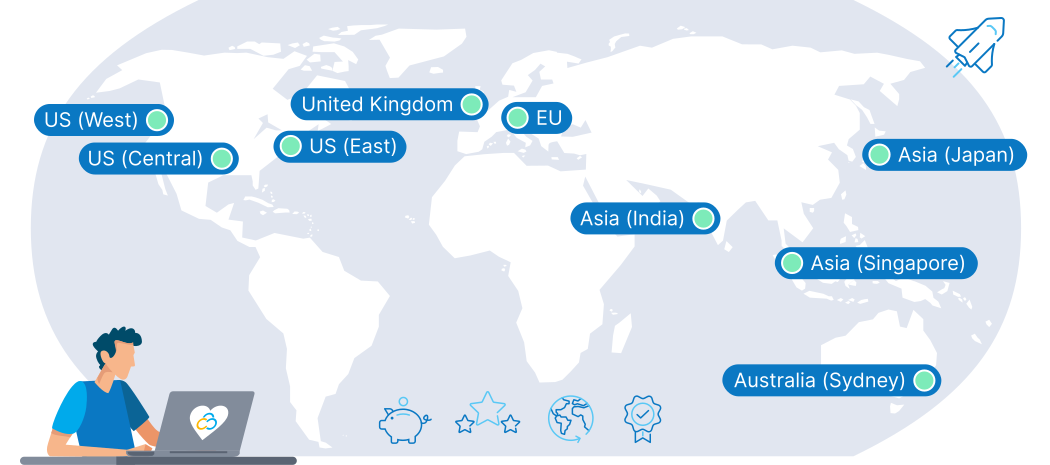
Choose the best location for your Linux VPS. Our flexible options allow you to cater directly to your customers, wherever they may be. Ensure ultra-low latency and a smooth online experience.
contabo-data-center-map_EN

Trusted by Thousands Worldwide

190
Countries Served
275,000+
Customers Worldwide
500,000+
Servers Running
23 Years
In business
bigbox_support-3_1-alt

First-class Customer Support


premium support experience for every customer is one of our cornerstones. Our team of highly-trained human support agents is here to help you 24/7, 365 days a year. We believe in offering many ways to find a solution, so you can get help instantly via live chat, explore our extensive self-support resources, or learn from our practical tutorial videos.


You don't have to take our word for it - our customers agree, with thousands of reviews earning us a 4.3 score on Trustpilot.


Learn more about the  Contabo Support Experience .

Frequently Asked Questions About Linux VPS

Linux VPS FAQs | Contabo
What is a Linux VPS?

A Linux VPS (Virtual Private Server) is a virtual machine with allocated CPU, RAM, and storage running Linux with full root access. Supported OS options include Ubuntu 22.04 & 24.04, AlmaLinux 9, Rocky Linux 9, Debian 11 and higher. You can use a Linux VPS to host websites and applications, run databases or containers, set up mail or VPN services, or manage development and testing environments - all with full root access and freedom to configure your system as you like.

What capabilities does a Linux VPS offer for users?

A Linux VPS offers a wide range of capabilities, including but not limited to: hosting web applications and websites, running database servers, setting up development and testing environments, hosting a VPN for secure browsing, running game servers like  Minecraft , and much more. Its versatility makes it suitable for personal projects, businesses, and developers alike.


See our  Ultimate Linux Guide  to learn more.

What steps are involved in setting up and managing a Linux VPS server?

Setting up a Linux VPS involves several key steps: choosing your Linux distribution, securing your server (setting up a firewall and SSH keys), updating the system, installing a web server (Apache, Nginx), setting up a database server (MySQL, PostgreSQL), and deploying your applications or websites.


Management can be done via SSH for command-line interface or through a control panel like cPanel or Plesk for a graphical interface. These tools allow you to install software, manage files, configure security settings, and monitor resource usage.


We make the process easy with preconfigured OS, Panel, App, and Add-On options that you can choose from when purchasing your new VPS.

What's the process for installing software on a Linux VPS?

Installing software on a Linux VPS typically involves using the distribution's package manager (apt for Debian/Ubuntu or yum for CentOS/Fedora). You can install most software with a simple command line instruction. For software not available in the package manager, you may download the software package directly from the provider and follow their installation instructions, or compile it from source code if necessary.

How can I migrate my website to a Linux VPS?

Migrating a website to a Linux VPS involves a few key steps: First, back up your website's files and databases from your current hosting environment. Then, transfer these files to your Linux VPS using a secure method like SCP or  SFTP . After transferring, you may need to configure your web server (Apache or Nginx) and database server on the VPS to match your website's requirements. Finally, update your domain's DNS settings to point to your new VPS IP address. Test your site thoroughly to ensure everything is running smoothly before going live.

Can Windows be installed on a Linux VPS, or how can I connect to my Linux VPS from Windows?

Installing Windows on a Linux VPS is technically possible with virtualization technologies like KVM that support Windows OS installations. You would need a Windows ISO and a VPS plan that supports KVM. Note that Windows requires a license, and running Windows on a Linux VPS might not be supported by all providers.


To connect to a Linux VPS from Windows, use an SSH client like PuTTY. Download and install PuTTY, launch it, enter your VPS's IP address in the 'Host Name' field, specify the port (usually 22 for SSH), and click 'Open' to initiate the connection. When prompted, enter your username and password provided by your hosting service.

How to secure a Linux VPS?

Enhancing your VPS's security involves a few essential steps: regular updates,  configuring a firewall  (like UFW or iptables), using  SSH keys  instead of passwords for remote access, disabling root logins, and  setting up fail2ban  to protect against unauthorized access attempts. Additionally, conducting  regular security audits  and employing a robust backup solution are recommended.


Are there ways to obtain a free Linux VPS for testing or development?

Some providers offer limited-time free trials or have a free tier for their VPS hosting services, primarily aimed at developers or small-scale testing environments. These offerings are usually intended for learning, developing, and testing applications before committing to a paid plan.


Be aware that free plans often come with significant limitations on resources and support. That's why we offer the best-priced VPS on the planet, making it easy for you to enjoy a world-class VPS without breaking the bank.

Linux vs Windows VPS - which is better?

The choice between Windows and Linux for your VPS depends on your intended usage, familiarity with the operating system, and cost considerations. Linux is often preferred for web hosting, development environments, and servers running applications like databases or CMS platforms due to its stability, security, and lower costs. Windows is suitable if you rely on Microsoft technologies such as ASP.NET or need to run Windows-specific software. Your comfort level and expertise with either Linux or Windows should also guide your decision.

Should I choose a VPS or a Dedicated Server for my Linux setup?

Whether a VPS or a dedicated server is better for your Linux setup depends on your resource requirements, scalability needs, and budget. A VPS offers a cost-effective solution with flexible scaling options, making it ideal for small to medium-sized projects that need to manage growth efficiently. A Dedicated Server provides exclusive access to all resources, offering higher performance and security for resource-intensive applications, large-scale websites, or businesses with specific compliance requirements.

Can I pay for my VPS in dollars?

Yes, Contabo accepts payments in dollars, along with Euros and British Pounds. This flexibility ensures that customers from around the world can easily pay for their hosting services without worrying about currency conversion rates.

Do you also offer Linux VPS in the USA?

Yes, we offer Linux VPS hosting services at our  USA locations , and in other regions around the world. Hosting your VPS in the USA can provide benefits such as reduced latency for your American audience, compliance with local regulations, and access to state-of-the-art Data Center facilities to ensure the best performance and reliability for your applications.

How to set up a VPS server on Linux?

After deployment, connect to your VPS with the IP, username, and password from your provider. Then update the system, create users, and install the software or services you need. You can find a step-by-step guide in our article on  How to Install and Connect to Your Contabo Server .

How to open a port on a Linux VPS?

Use a firewall tool such as UFW or iptables. For example, run 'sudo ufw allow 8080' for UFW to open port 8080, then verify to confirm the rule is active. Find our more in our article on  How Do I Change My Server's Port?  or, specific to UFW,  How to Use Linux UFW .

How to use a Linux VPS?

You can use a Linux VPS to host websites, run databases, deploy apps, or manage development projects. Connect via SSH to control the system from your terminal. If you don't know how to connect with SSH, check out our article on  How to Set Up an SSH Connection with Contabo .

How to restart a microservice on a Linux VPS?

Use your service manager, for example: 'sudo systemctl restart service-name'. Replace “service-name” with the actual name of your microservice (e.g., nginx, docker, or app.service). New to the concept? Learn the basics in our blog on  What are Microservices?

Linux VPS Guides

Quick, practical blog guides to help you get the most from your Linux VPS
linux-mail-server-setup

Set up a reliable Linux mail server from scratch: domains, DNS, SMTP/IMAP, and security essentials.
Learn the steps in  Linux Mail Server Setup and Configuration


blog-ref_how2_check_disk_space_usage_in_linux

Quickly check and manage disk usage on Linux with built-in tools and practical tips.
See how in  How to Check Disk Space Usage in Linux

blog-ref_linux-logs-explained

Make sense of Linux logs fast: where to find them, how to read them, and what to monitor.
Read more in  Linux Logs: Boost Your System Performance and Security