
























































































 Coolify VPS Hosting
 Self-Hosted Coolify: Deploy Docker Apps On Your Own Server
 Free Pre-Installed Coolify No Per-App Fees Full Data Control
 The simplest way to start Coolify hosting on infrastructure you control, with effortless app deployment, no platform fees, and no lock-in.
Coolify
First App
Coolify
First App
Perfect for getting started with personal projects and hobby sites.
4 vCPU Cores
8 GB RAM
100 GB SSD
Auto Backup available
Coolify
Production Stack
Coolify
Production Stack
Ideal for running a handful of live apps, databases, and services.
6 vCPU Cores
12 GB RAM
200 GB SSD
Auto Backup available
Coolify
Growing Platform
Coolify
Growing Platform
Great for multiple services, background workers, and staging environments.
12 vCPU Cores
48 GB RAM
400 GB SSD
Auto Backup available
Coolify
Multi-App Host
Coolify
Multi-App Host
Built to run multiple client projects and heavy Docker workloads.
18 vCPU Cores
96 GB RAM
600 GB SSD
Auto Backup available
What is Coolify?
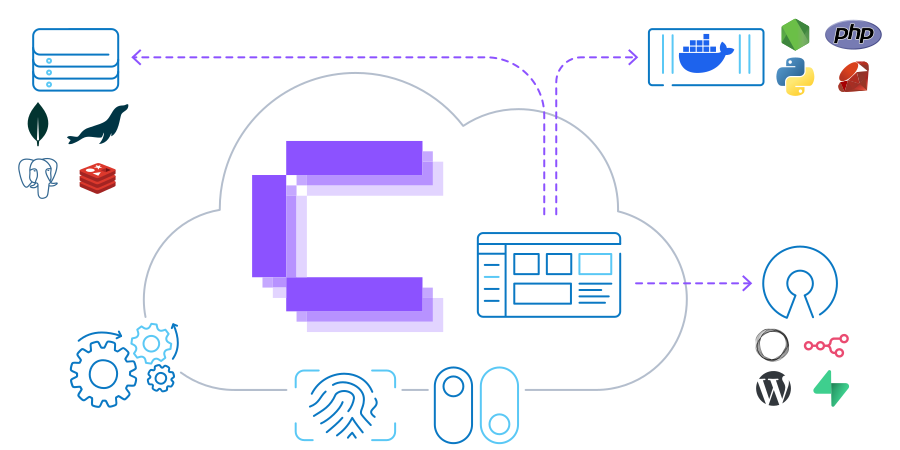
Coolify is an open-source PaaS (platform as a service) tool that runs on your VPS and gives you a clean web interface for deploying apps, databases, and services without writing long setup scripts or managing server configurations by hand. You connect your server, link your code repository, and Coolify takes care of building your app, getting it online, and keeping it running.
Coolify features include one-click service templates for popular tools, real-time logs, automatic SSL, and support for any app packaged with Docker. Coolify VPS requirements are lightweight, making it an easy, budget-friendly option to run on any server.
What Can You Deploy With Coolify?

Web Applications
Node.js, Python, PHP, Go, Ruby, Rust, Java, static sites, and any app that runs in a container.
Databases
PostgreSQL, MySQL, MariaDB, MongoDB, Redis, and more - on the same server as your app.

Open-Source Tools
n8n, Supabase, Ghost, WordPress, Uptime Kuma, MinIO, Grafana, and Plausible Analytics.

Background Jobs
Scheduled tasks, queue workers, and automated processes running in the background.

Internal Tools
Private dashboards, admin panels, and internal services that aren't publicly exposed.

Any Dockerfile
If it runs in a container, it runs on Coolify - no matter the language, framework, or stack.
Why Self-Host Coolify on the Contabo Cloud?

Pay one flat monthly fee for your VPS — no extra usage-based costs.

Unlimited apps and services —install Coolify once and deploy multiple projects.
Full access to your server — log in as root, customize anything, and manage your data.

Scale when you're ready — easily upgrade your plan as you add more projects.

DDoS protection and snapshots included — your apps stay up, and your data stays safe.

Meets Coolify system requirements — all plans exceed the Coolify VPS requirements.
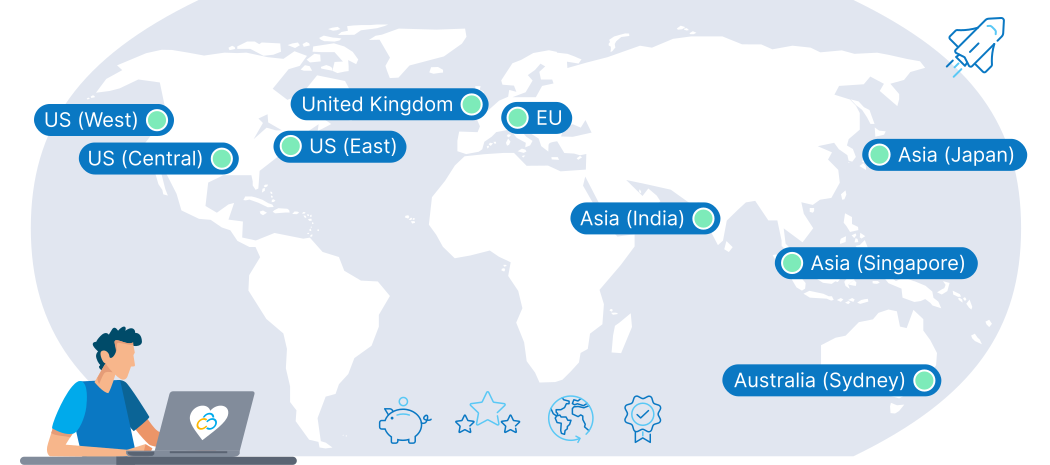
9 Regions, 11 Locations, Global Availability
Trusted by Thousands Worldwide
Coolify Guides

This article breaks down the differences between these two popular PaaS platforms to help you choose the right platform for your workflow: Coolify vs Dokploy: Complete Comparison Guide 2026
Coolify FAQs
What is Coolify?
How does Coolify work?
Does Contabo offer support for Coolify?
The price displayed is the effective monthly rate for a 24-month subscription including applicable taxes.
Minimum initial contract length: 1 month | Minimum following contract length: Equal to the initial contract length | Minimum cancellation notice: None (pre-paid) or 4 weeks (post-paid).
Incoming Traffic: Unlimited and unmetered. No extra charges apply. | Outgoing Traffic: Unlimited - fair usage policy applies based on average server workloads. To maintain fair network performance for all customers, Contabo reserves the right to throttle servers with exceptionally high or disruptive usage patterns.
Applications and Add-Ons: Contabo provides full technical assistance for the Contabo VPS itself - including the network, hardware, and initial setup of any 1-click Add-Ons. Any additional open source software included in the applications is owned by the respective provider - maintenance, upgrading, and troubleshooting are within the end-users responsibility.