
Since we rolled out the new Customer Control Panel design at new.contabo.com, we’ve been listening carefully to your feedback on the portal and steadily making improvements for you. If you’ve ever been a sub-user on someone else’s Contabo account and wished you could run your own account from the same login, that wait is over.
The new design now supports multiple users and adds role-based access for all user types, with more features on the way. Put together, it’s the update that finally makes the new.contabo.com feel like a real team tool.
Curious to find out how this update can change your Contabo server management experience? Read on to find out more about this exciting update.
What Changed
Two new features were introduced in this release: multi-user support and extended user management. One more, the Add-On Manager, will follow in the coming weeks.
Multi-user support: one login, many accounts
Multi-user support means one email can now hold a main account and any number of sub-accounts, with a switcher in the account menu so you never need to sign out to move between them. Until this release, one email meant one account. That was fine until it wasn’t. If you were already a Sub-user under another customer’s account in new.contabo.com, you couldn’t open your own main account with the same email. Plenty of you told us about this, so thanks for bringing this small but obvious frustration to our attention.
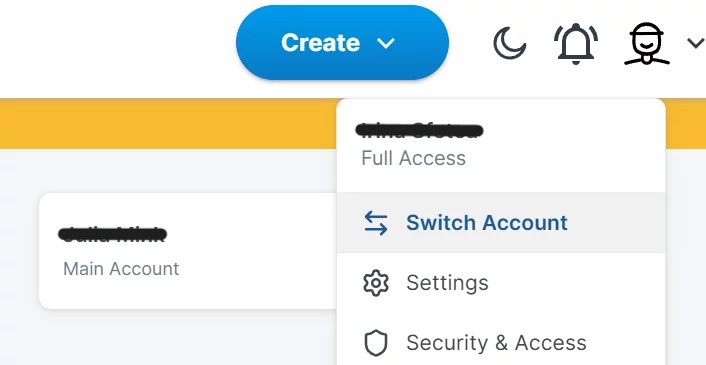
If you have access to multiple accounts, you’ll find the account switcher in the top right user menu.
It’s important to note that if you’re an existing Sub-user in new.contabo.com, setting up your own main account doesn’t mean you lose access to anything you already manage. If you’re switching from my.contabo.com, Sub-users will need to be recreated in new.contabo.com, as these won’t carry over from Contacts in the old system. Contacts will remain in my.contabo.com for a while, and we’ll notify you before these are disabled.
Extended user management: the roles you were missing are back again
Our older CCP design had a Contact system that let you define who could do what under your account. We’ve brought that into the new version as user management, with extended features. Sub-users can now log in and independently perform actions on behalf of the main account.
Sub-users in new.contabo.com are like Contacts in my.contabo.com, but with additional functionality. They verify their identity to get in, and once they’re in, they can only see and do what their assigned role allows. They can now take permitted actions on behalf of the main account in addition to communicating with Support. The email addresses for Contacts and Sub-users remain the same, so our Support team will still know who you are and what you need help with. That part hasn’t changed.
For now, Chat and the Submission Form are open to main account holders only, so those requests still come from a verified main account. Sub-user access to both is coming in a later update — we thought we’d give you the main feature now rather than keep you waiting.
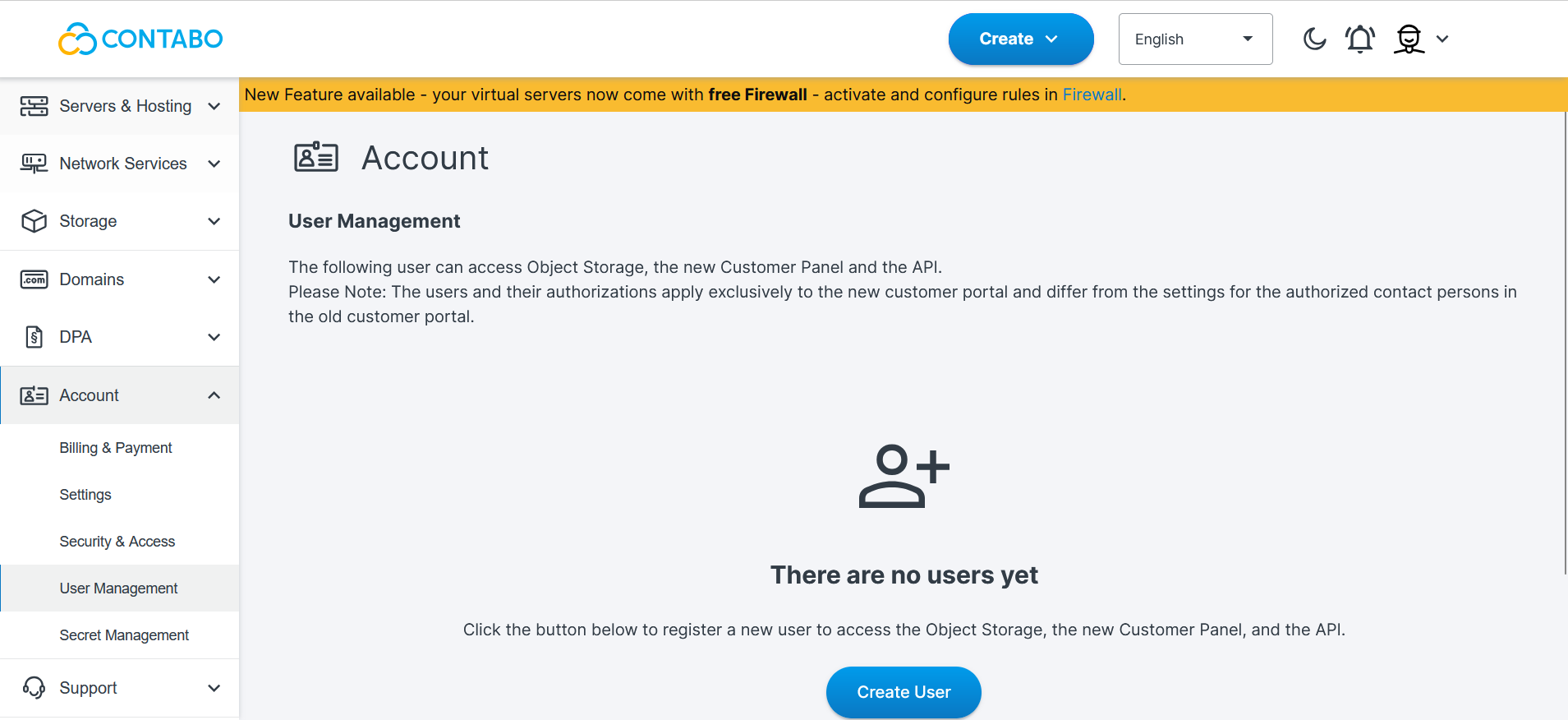
You’ll find the new User Management section under the Account menu.
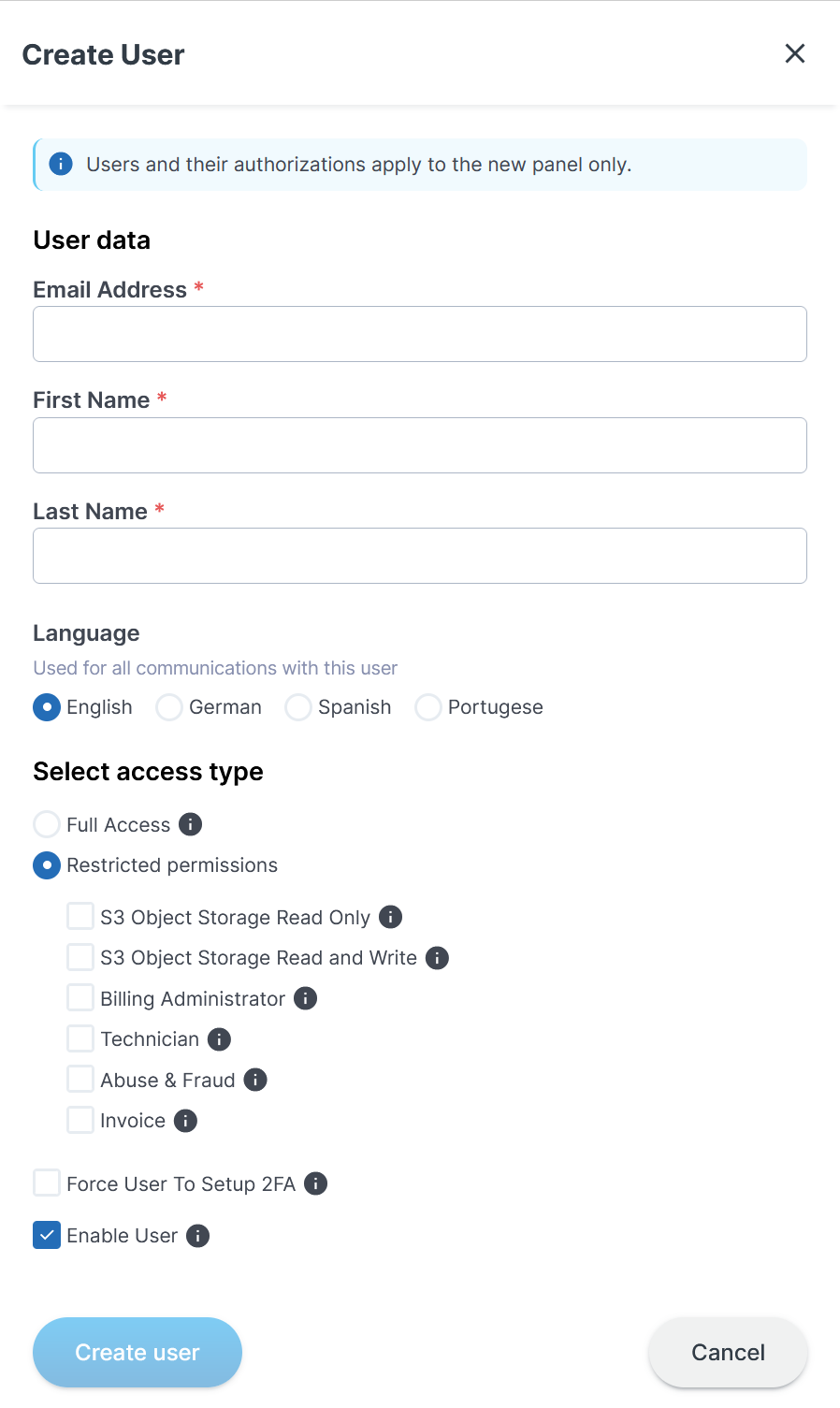
Here you can create a new user and set permissions.
Coming soon: the Add-On Manager
The Add-On Manager is the first part of the previous ordering workflow to land on new.contabo.com. In its initial version, you’ll be able to order and terminate Auto Backup and the Private Network Add-On from within the portal, as well as manage Licenses, Full Monitoring, and Storage Extensions. It’s not yet live, but we’ll bring it online soon and keep you updated.
You’ll still find any missing Add-On functionality in my.contabo.com for now. We expect to finish the remaining Add-On functionality within the next few weeks. That’s the point where we can start winding down the old ordering flow for good.
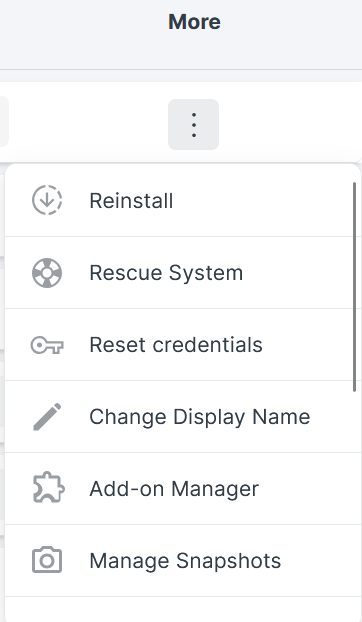
In the Servers and Hosting section, you’ll find the Add-On Manager for each of your products under the More column (click the three dots).
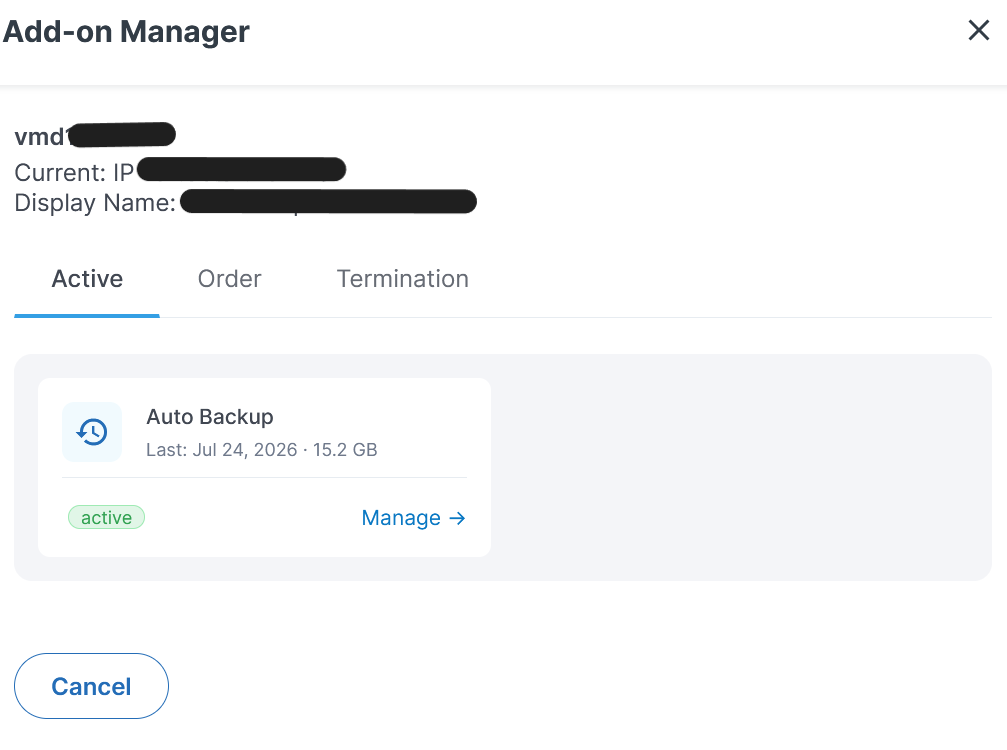
From here you can view active Add-Ons, order new ones, and terminate existing ones.
Why We Made These Changes
We built these updates to close the two gaps that kept teams and agencies tied to my.contabo.com: no way to hold more than one account role under a single email, and no role-based access to replace the old Contact setup. Both are fixed now.
The Add-On Manager is part of the same job. The goal is to pull everything into one place so my.contabo.com can retire without anyone losing a feature they depend on. We’re not interested in a migration that swaps one set of annoyances for another!
Who Is Affected
Most customers don’t have to do anything right now. If you’re happy where you are on my.contabo.com, it’s still there and still works — but bear in mind that it will be phased out soon, so we encourage you to start getting used to new.contabo.com and give us your feedback if anything doesn’t work for you.
If you’re currently a Sub-user on another account in new.contabo.com, you can now open your own main account without giving up access to the accounts you manage. Nothing changes unless you want it to.
If you manage Contacts in my.contabo.com, here is where things stand:
- Existing Contacts are unaffected for now. We’ll notify you when we plan to deactivate these.
- You can still remove Contacts from my.contabo.com as before.
- Creating new Contacts in my.contabo.com is no longer available. To add someone, invite them as a Sub-user in new.contabo.com.
To take advantage of multi-user support, log in to new.contabo.com and check the account menu. If you’re an existing Contact or Sub-user who now wants your own main account, you can create one at any time.
For all new Sub-user invitations, use new.contabo.com.
A Future-Proof CCP
We think this release is a real turning point for the new CCP design, and we hope you’ll agree. Multi-user support and role-based access aren’t flashy, but they’re the foundation every team and agency needs, and we know a lot of you have been waiting for them. We’re glad they’re finally here.
Once the Add-On Manager is complete, new.contabo.com will do everything my.contabo.com does. We believe that’s the moment it stops being “the new one” and simply becomes the CCP you use every day.
The countdown to retiring my.contabo.com has started, and we’ll keep you posted at every step. If something is missing or feels rough, tell us. That kind of feedback is how this release got here in the first place.
FAQ
Can I use one email address for multiple Contabo accounts?
Yes. One email can now be linked to a single main account plus any number of sub-accounts, as long as they share the same credentials. You switch between them from the account menu in new.contabo.com, with no signing out required. If you have a main account and want to change the email address for a Sub-user, you will need to set a new password. Before this release, each email was tied to one account, which blocked Sub-users from holding their own main account.
What happens to my existing CCP Contacts?
Nothing changes for them until later, when Contacts will be disabled. The only difference is that you can no longer create new Contacts in my.contabo.com. To add someone now, invite them as a Sub-user in new.contabo.com instead.
What roles are available in the new user management system?
The new user roles bring with them extended features and functionality. Main users naturally have full control over the account. Unlike Contacts in my.contabo.com, Sub-users can now do much more than just communicate with Support via email and gain the ability to perform actions on behalf of the main account independently. Of course, they must verify their identity to gain access, and once verified, they can only view and perform the actions permitted by their assigned role.
Which Add-Ons can I manage in the Add-On Manager right now?
None yet, but soon you’ll be able to order and terminate Auto Backup and the Private Network Add-On directly from the new CCP. Other Add-On types are still under development, and the equivalent options remain in my.contabo.com. We expect the full functionality to be available in the coming weeks.
Can sub-users access Chat and the Submission Form?
Not yet. Chat and the Submission Form are open to main account holders only for now, so those requests still come from a verified main account and our verification process stays intact. We plan to extend both to Sub-users in a future update, though we haven’t locked in a date yet. It’s on the list.