If you run cPanel on a Contabo VPS, the control panel you work in every day has a new interface option. cPanel and WHM version 138 introduces Meridian, a redesigned cPanel theme with task-based navigation, a built-in AI Assistant, and Model Context Protocol (MCP) support. It is opt-in, so nothing changes on your accounts until you decide it should.
The practical guide below was written by Sergey Kalmykov, Senior Sales Engineer at cPanel. It covers what Meridian changes and how to try the theme on a test account before you touch a production site.
A practical guide to cPanel Meridian, from the cPanel team
Introduced in cPanel & WHM version 138, Meridian brings a redesigned cPanel experience that makes it easier for hosting customers to create and manage their websites, email accounts, and web applications. Task-based navigation, an intuitive Dashboard, Guided Setup, and a Command Palette help simplify everyday hosting tasks, while new AI capabilities, including a built-in AI Assistant and Model Context Protocol (MCP) support, offer additional ways to work with hosting tools and manage websites.
For VPS customers using cPanel, Meridian offers a more intuitive way to manage websites and hosting accounts, with AI-assisted guidance where enabled, while WHM remains the interface for server administration.
More intuitive cPanel administration
Meridian is opt-in and reversible. Existing accounts continue to use Jupiter by default, but you can switch individual accounts to Meridian or configure it as the default theme for new accounts through WHM. Switching themes doesn’t change your websites, DNS records, mailboxes, databases, or underlying account configuration.
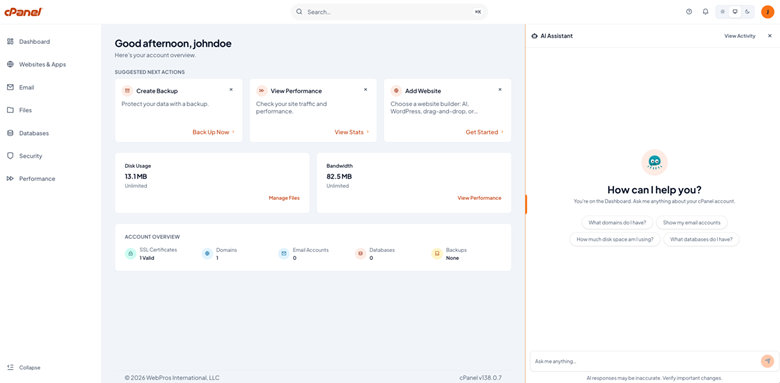
The interface organizes tools into six task-oriented hubs:
- Websites & Apps: Domains, DNS and PHP version Management, available website builders and web applications.
- Email: Mailboxes, forwarders and Webmail.
- Files: File Manager, backups, and file transfer accounts.
- Databases: MySQL databases, users, and access permissions.
- Security: SSL/TLS, ModSecurity, SSH keys, and two-step verification.
- Performance: Bandwidth, disk usage, and PHP configuration.
The Websites & Apps hub consolidates information about domains, applications, SSL status, PHP versions, and resource usage. If you manage multiple websites, checking their configurations becomes easier without opening each one individually.
The Dashboard provides a central overview of account health, including certificate issues, backup status, disk usage, bandwidth, and other items requiring attention. This is especially useful for unmanaged VPS customers who handle their own maintenance and troubleshooting.
For experienced users, the Command Palette offers a faster way to find tools and actions. Press Cmd + K on macOS or Ctrl + K on Windows/Linux, or use the search field in the header.
Guided Setup simplifies website deployment
Meridian’s Guided Setup helps customers get their websites up and running through a guided workflow. Available deployment options may include Sitejet Builder for visual website creation, WordPress installation, AI App Hosting for Node.js applications, and custom-code deployment.
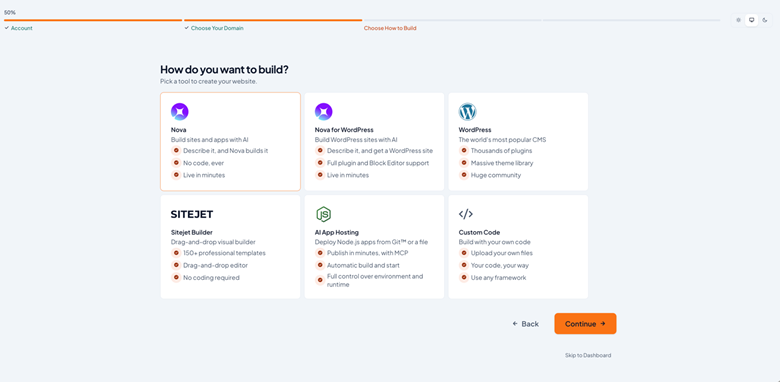
Depending on the features available in your cPanel account, you can choose the setup method that best suits your website or application.
AI Assistant: Help with administration
Meridian’s AI Assistant provides contextual help through the Ask AI button. It can explain cPanel features, assist with troubleshooting, interpret relevant diagnostics, and help investigate DNS, SSL, email, database, and AutoSSL issues.
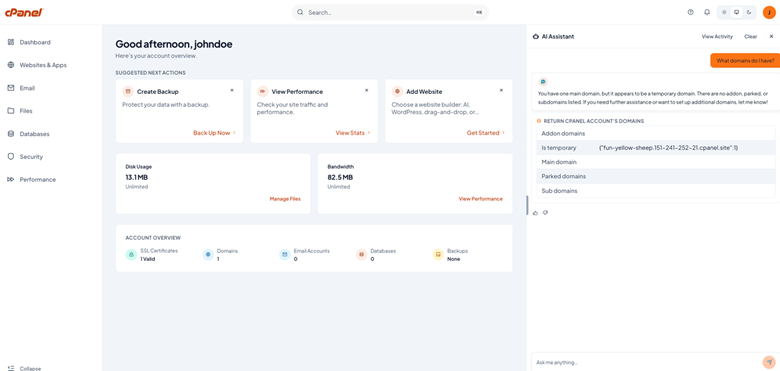
For supported administrative actions, the Assistant previews proposed changes and requires explicit confirmation before executing them. If you prefer, you can request manual instructions instead. Administrators retain control over the availability of AI features and write permissions.
As always, VPS administrators should review the provider’s documentation and configuration before enabling AI features.
AI App Hosting: From code to deployment
AI coding tools such as Cursor, Claude Code, and Replit can speed up application development, but deploying the resulting code still requires a suitable runtime, networking, and security configuration.
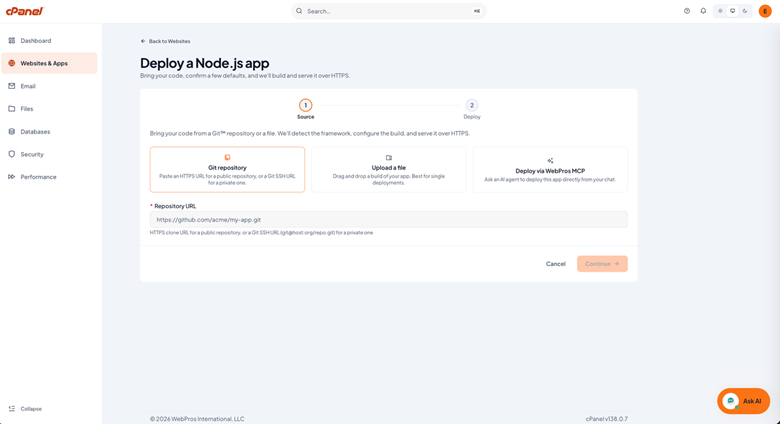
AI App Hosting aims to simplify that process for Node.js applications. It can install dependencies, create a rootless Podman container, configure reverse-proxy routing, and start the application through cPanel.
The typical workflow is straightforward:
- Open Websites & Apps → + Add Website.
- Select a subdomain and choose AI App Hosting.
- Select a Git repository, ZIP archive, or via WebPros MCP.
- Review the Node.js version, environment variables, and build commands.
- Deploy the application and monitor its build logs.
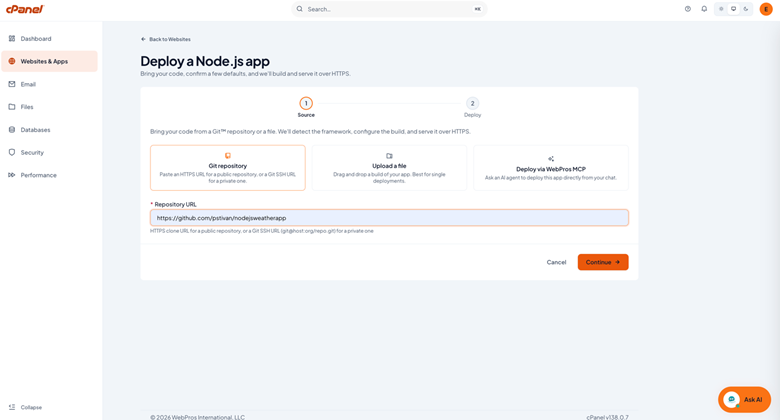
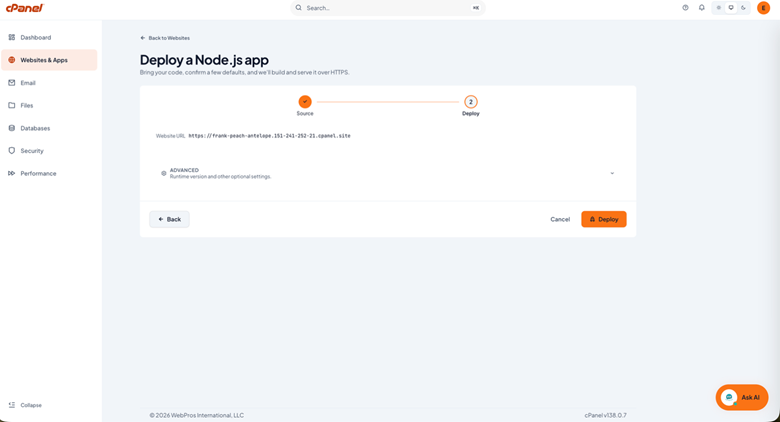
After deployment, cPanel handles the reverse proxy and AutoSSL configuration as supported by the workflow.
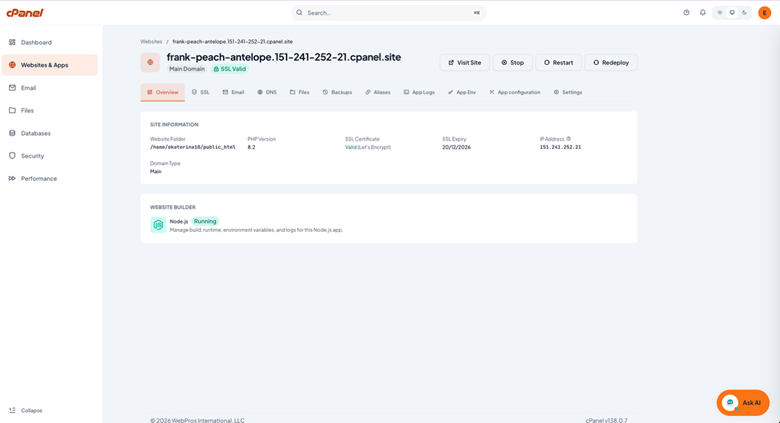
However, containers still consume VPS resources. The documented configuration allocates 512 MB of RAM per running application, with a default maximum of four applications per account. Running Node.js applications alongside traditional websites requires enough additional memory and CPU capacity for the combined workload. A VPS with 4–8 GB of RAM may be a reasonable starting point, depending on the number and demands of your applications.
MCP connects AI tools to cPanel
Model Context Protocol (MCP) provides a structured way for external AI tools, including compatible coding assistants, to interact with cPanel.
Rather than sharing VPS root credentials, users can connect tools through their authenticated cPanel accounts, with access governed by the relevant permissions and directory scope. Administrators can also manage access and, where supported, enforce read-only API operations.
The principle is simple: AI tools can assist with hosting tasks without automatically receiving unrestricted access to the server. Permissions should still be reviewed carefully, and access can be revoked when it’s no longer needed.
Getting started on a Contabo VPS
Meridian doesn’t eliminate every Jupiter workflow. Some legacy application, Git, email, and domain-management functions may still require the classic interface, which remains accessible through the theme selector.
To evaluate Meridian, start with a test account or subdomain:
- Check that your server runs cPanel & WHM version 138 and a supported operating system.
- Enable Meridian as preferred theme in WHM Package manager or switch an existing account’s theme.
- Make sure that Web Apps for AI App Hosting, AI Assistant and MCP connections are enabled in WHM’s Feature Manager if you want to test these features.
- Explore the Dashboard, Guided Setup, and Command Palette.
- Test application deployment and review resource usage before moving production workloads.
Confirm the current system requirements and feature availability in the official cPanel documentation before making changes.
Frequently asked questions
Does Meridian replace Jupiter?
No. Meridian is optional, and Jupiter remains available for workflows that haven’t migrated.
Will changing themes affect my websites?
No. Theme switching changes the interface, not your underlying account data or website configuration.
Can the AI Assistant change my account?
Supported write actions require confirmation, and administrators control whether those actions are enabled.
What does AI App Hosting support?
The workflow described here supports Node.js applications running in isolated Podman containers.
Who controls AI features?
Server administrators manage feature availability and permissions through WHM and server configuration.
Try Meridian on your own VPS
Meridian gives cPanel users a new way to work, and a test account is a low-risk way to see whether it suits you. If you run cPanel on a Contabo VPS, help is split cleanly: the license includes access to free cPanel support for questions about Meridian and other cPanel features, and Contabo support covers the VPS underneath. If you don’t use cPanel yet, Contabo offers cPanel & WHM licenses for VPS.
Switch a test account to the new theme and see how your daily tasks feel.