


















































































VIRTUALIZATION SOLUTIONS
Optimize Your IT Infrastructure with Virtualization
Enhance your hardware by building your own virtualization solutions on the Contabo cloud. Run multiple virtual environments on powerful, affordable servers to boost performance and cut costs.
Harness the Power of Virtualization for your Projects
- •6 Virtual CoresAMD EPYC 7282 2.8 GHz
- •24 GB RAM
- •180 GB NVMe More storage available
- •250 Mbit/s Port
- •Unlimited Traffic*
- •8 Virtual CoresAMD EPYC 7282 2.8 GHz
- •32 GB RAM
- •240 GB NVMe More storage available
- •500 Mbit/s Port
- •Unlimited Traffic*
- •12 Virtual CoresAMD EPYC 7282 2.8 GHz
- •48 GB RAM
- •360 GB NVMe More storage available
- •750 Mbit/s Port
- •Unlimited Traffic*
- •16 Virtual CoresAMD EPYC 7282 2.8 GHz
- •64 GB RAM
- •480 GB NVMe More storage available
- •1 Gbit/s Port
- •Unlimited Traffic*
- •24 Virtual CoresAMD EPYC 7282 2.8 GHz
- •96 GB RAM
- •720 GB NVMe More storage available
- •1 Gbit/s Port
- •Unlimited Traffic*
Virtualization Basics
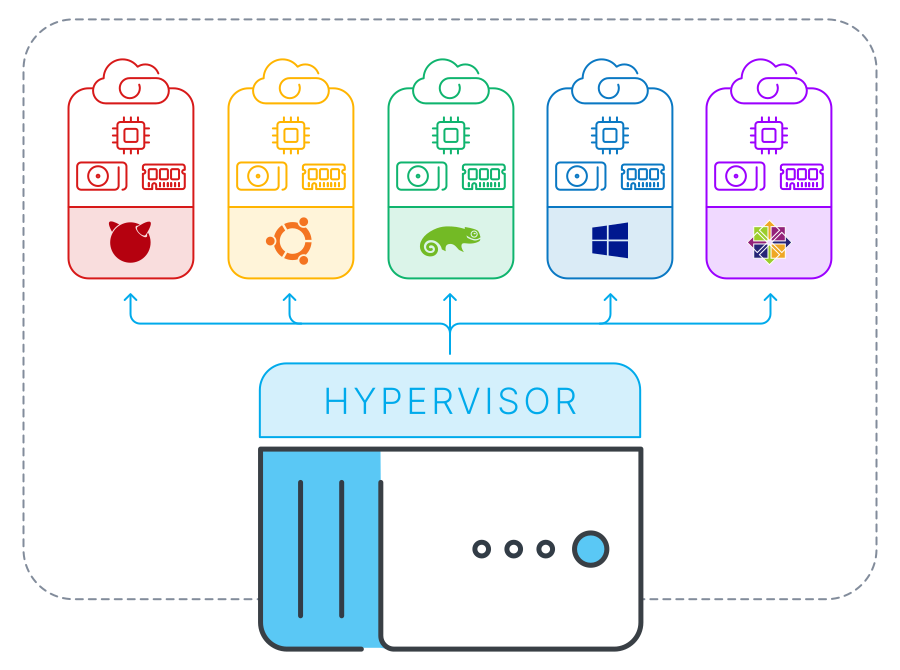
Virtualization is a technology that allows you to run multiple simulated environments or virtual machines (VMs) on a single physical hardware system.
By using software called a hypervisor, virtualization separates the physical hardware into distinct, independent environments, each with its own operating system and applications. You can use virtualization to optimize your IT infrastructure, improve efficiency and security, and reduce expenses.
At Contabo, we use advanced Kernel-based Virtual Machine (KVM) technology to provide high-performance, secure, and scalable cloud servers on which to build your ideal virtualization solution.
On our VDS and Dedicated Servers, you can install the hypervisor software of your choice to create nested virtualized environments. You can also use a hypervisor to link multiple Cloud VPS instances and create your own private VM network, or use containers to virtualize individual applications.
How To Set Up Your Virtualized Environments on Contabo Servers

Set Up Your Server
Choose a VDS or Dedicated Server based on your needs and install the desired OS.
Install the Hypervisor
Install your hypervisor of choice to create and manage your virtual machines.
Configure Networking
Set up network settings for your VMs using bridge or NAT networking to ensure connectivity.
Configure VMs
Create virtual machines and allocate CPU, memory, and storage resource
Install OS & Manage
Install operating systems on your VMs and use hypervisor tools to manage them.
Why Choose Virtualization for Your Online Projects?



Popular Virtualization Software Options

Proxmox VE
VMware ESXi
Microsoft Hyper-V

Oracle VM VirtualBox
Citrix Hypervisor

Red Hat Virtualization
How Contabo Supports Your Virtualization Needs

High Performance
Powerful hardware handles demanding workloads efficiently, so applications run smoothly across all VMs.

Reliability
High uptime commitments and robust infrastructure ensure your virtualized environments are always available.

Security & Compliance
Always-on DDoS Protektion and GDPR-compliant infrastructure keep your information safe and secure.

Simple Server Admin
Our intuitive Customer Control Panel makes configuration and maintenance of your server a breeze.
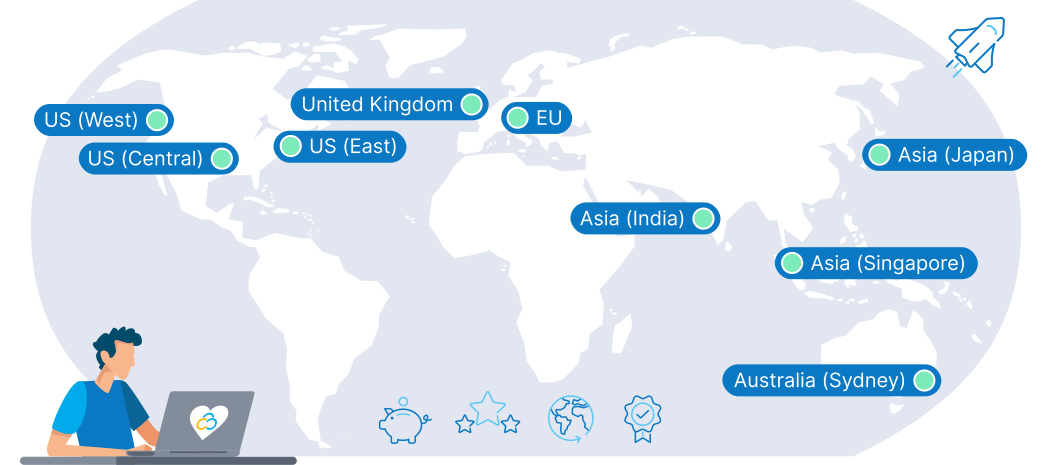
9 Regions, 11 Locations, Global Availability

First-class Customer Support
A premium support experience for every customer is one of our cornerstones. Our team of highly-trained human support agents is here to help you 24/7, 365 days a year. We believe in offering many ways to find a solution, so you can get help instantly via live chat, explore our extensive self-support resources, or learn from our practical tutorial videos.
You don't have to take our word for it - our customers agree, with thousands of reviews earning us a 4.3 score on Trustpilot.
Learn more about the Contabo Support Experience.
Trusted by Thousands Worldwide