





























New Performance VPS : AI-ready power at VPS prices, with AMD EPYC CPUs and NVMe storage.

img-alt

Self-Host Bitwarden on a VPS:
Your Secure Password Vault

Take control of your passwords with confidence. Set up Bitwarden on a Contabo VPS for top-notch security and privacy at an affordable price.
hero-banner_bitwarden-alt
Cloud VPS 4
€5.50
4
40 / month
✔️
4 vCPU Cores
8 GB RAM
100 GB SSD More storage available
1 Snapshot
200 Mbit/s Port
Unlimited Traffic*
Cloud VPS 6
€7.50
6
00 / month
✔️
6 vCPU Cores
12 GB RAM
200 GB SSD More storage available
2 Snapshots
300 Mbit/s Port
Unlimited Traffic*
Cloud VPS 8
€14.00
11
20 / month
✔️
8 vCPU Cores
24 GB RAM
300 GB SSD More storage available
3 Snapshots
600 Mbit/s Port
Unlimited Traffic*
Cloud VPS 12
€25.00
20
00 / month
✔️
12 vCPU Cores
48 GB RAM
400 GB SSD More storage available
3 Snapshots
800 Mbit/s Port
Unlimited Traffic*
Cloud VPS 16
€37.00
29
60 / month
✔️
16 vCPU Cores
64 GB RAM
500 GB SSD More storage available
3 Snapshots
1 Gbit/s Port
Unlimited Traffic*
Cloud VPS 18
€49.00
39
20 / month
✔️
18 vCPU Cores
96 GB RAM
600 GB SSD More storage available
3 Snapshots
1 Gbit/s Port
Unlimited Traffic*

Bitwarden Basics

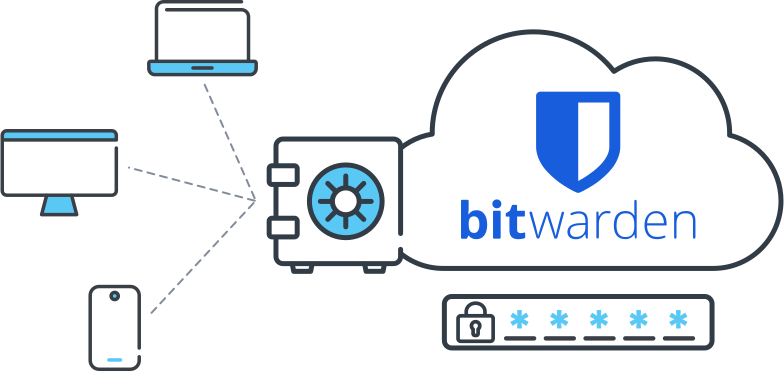
Bitwarden  is an open-source password manager that securely stores and shares sensitive information using end-to-end encryption. It offers features like password generation, autofill, cross-platform sync, and two-factor authentication.


Self-hosting Bitwarden on a Contabo VPS gives you full control over your password vault. It's ideal for tech-savvy users, privacy-conscious individuals, and organizations that need to keep sensitive data in-house.


With this setup, you get the security of a cloud-based solution with the privacy of keeping your data on your own server. You can create a secure, personalized password management system that fits your exact needs.
bitwarden-basics

Why Host Bitwarden on a Contabo VPS?

Get the best of both worlds: cloud convenience with the control and privacy of self-hosting. Here's why a Contabo VPS is perfect for your Bitwarden setup:
icon_secrets-management-alt

Full Control & Privacy

With Bitwarden on your Contabo VPS, you're in charge. Manage your data, control access, and ensure your sensitive information stays on your own server.
Cost-Effective Solution-alt

Cost-Effective Solution

Our affordable VPS plans give you powerful resources at a fraction of the cost of other providers. Perfect for individuals and teams on a budget.
Icon Security alt

Enhanced Security

Implement your own security measures on top of Bitwarden's robust encryption. With full root access, you can fine-tune your server's defenses to meet your needs.
icon scalability

Scalability

Start small and grow as needed. Our VPS plans are easily upgradable, allowing your Bitwarden installation to scale with your changing requirements.
icon_configuration

Customization

Tailor your Bitwarden setup to your exact specifications. Install additional tools, integrate with other services, or modify the environment to suit your workflow.
icon_power

Reliable Performance

Our high-performance VPS ensures your password vault is always accessible. With our global Data Center network, you get low-latency access wherever you need it.

Operating Systems, Apps, and Deployment Options for Your Virtual Private Server

Make your server your own with multiple deployment options, including 1-click cloud-init images. Don't see what you're looking for? We welcome your suggestions!
logo_small_ubuntu
Ubuntu
image windows
Windows
logo_centos
CentOS
vps-page-tab-freebsd
FreeBSD
vps-page-tab-debian
Debian
vps-page-tab-opensuse
OpenSUSE
vps-page-tab-almalinux
AlmaLinux
vps-page-tab-rockylinux
RockyLinux
icon cpanel
cPanel
vps-page-tab-panel-plesk
Plesk
vps-page-tab-panel-docker
Docker
vps-page-tab-panel-webmin
Webmin
vps-page-tab-panel-proxmox
Proxmox
image Custom Images

Deploy Your Perfect Image

With  Custom Images , you can instantly deploy your .iso or .qcow2 image via web UI or API.

vps-page-tab-blockchain-ethereum
Ethereum
vps-page-tab-blockchain-bitcoin-img
Bitcoin
vps-page-tab-blockchain-ipfs
IPFS
vps-page-tab-blockchain-flux
Flux
vps-page-tab-blockchain-horizen
Horizen
vps-page-tab-1-click-openclaw
OpenClaw
vps-page-tab-1-click-openclaw
n8n
vps-page-tab-1-click-nextcloud
Nextcloud
vps-page-tab-1-click-wiregurad
WireGuard
vps-page-tab-1-click-gitlab
GitLab

Getting Started with Bitwarden on Your Contabo VPS

Set up your secure password vault in just a few steps. Here's a quick guide to get you started:
five-steps_bitwarden-alt

Prepare Your Server


Choose your VPS, log in, and update your system. Install Docker and Docker Compose, essential for running Bitwarden.

Configure Bitwarden


Download the Bitwarden installation script and configure it with your domain name and other essential settings.

Set Up SSL Encryption


Secure your instance with SSL/TLS encryption. SSL certificates are available as an Add-On or from your chosen provider.

Launch Bitwarden


Start your Bitwarden container using Docker Compose and access your new password vault through your web browser.

Finalize Setup


Create your admin account, set up two-factor authentication, and start adding your passwords to your secure vault.

Managing Your Self-Hosted Bitwarden Instance

Taking control of your password security with a self-hosted Bitwarden setup means you're also responsible for its management. Here's what you need to know to keep your instance running smoothly and securely:
icon_access-management-alt

Security Best Practices


  • Keep your Bitwarden instance updated with the latest security patches.
  • Enable two-factor authentication on admin and user accounts.
  • Configuring strong network firewalls to protect your server.
  • Monitor access logs to detect any suspicious activity.

icon_update-alt

Maintenance and Updates


  • Back up your data carefully before beginning any update.
  • Use the Bitwarden update script to download and install the latest version.
  • Check for any post-update tasks in the release notes.
  • Monitor your resource usage and upgrade your server if needed.

icon_auto-backup

Backup and Recovery


  • Schedule regular backups of your Bitwarden database.
  • Store your backups in a secure, off-site location to prevent unwanted access.
  • Test your backup restoration process regularly to ensure it works as needed.
  • Consider keeping multiple versions of your backups.

icon_community

Troubleshooting Common Issues


  • Check your server logs for error messages to identify the problem.
  • Ensure all Bitwarden services are running correctly.
  • Verify your database connection is stable and secure.
  • Consult the Bitwarden community forums or documentation.

9 Regions, 11 Locations, Global Availability
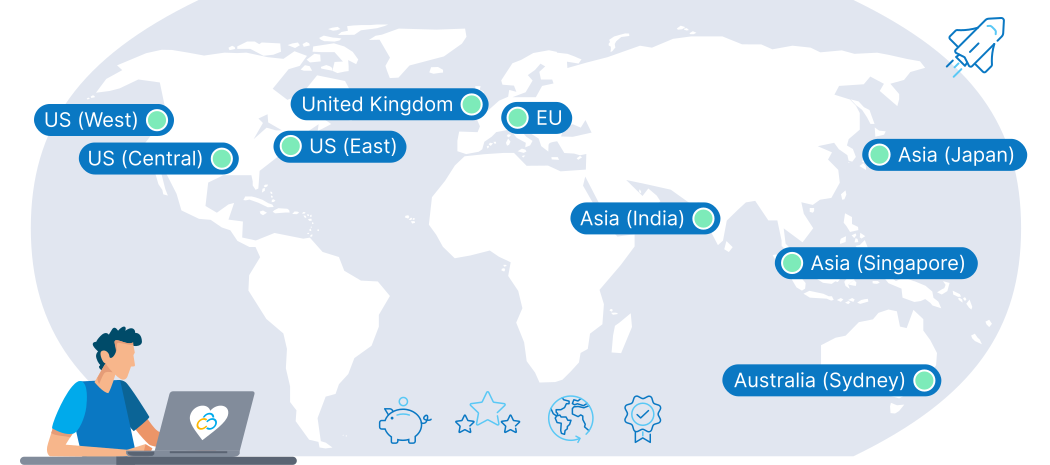
Choose the ideal location for your self-hosted Bitwarden vault. Our global network of Data Centers lets you keep your passwords secure, accessible, and nearby, wherever you are.
Map Location en

Trusted by Thousands Worldwide

190
Countries Served
275,000+
Customers Worldwide
500,000+
Servers Running
23 Years
In business

See Why Customers Love Contabo

Frequently Asked Questions about Hosting Bitwarden on a Contabo VPS

FAQs | More information on Bitwarden VPS hosting with Contabo
What are the system requirements for self-hosting Bitwarden on a Contabo VPS?
Is it safe to self-host Bitwarden on a Contabo VPS?

Self-hosting Bitwarden on our VPS can be safe when proper security measures are implemented. We provide infrastructure security like  always-on DDoS protection , but you're responsible for securing your Bitwarden instance. This includes using strong passwords, enabling two-factor authentication, and keeping your server and Bitwarden software up-to-date. Our VPS platform gives you the control to implement these security best practices with ease.

How do I set up SSL for my self-hosted Bitwarden instance on Contabo VPS?

Setting up SSL for your Bitwarden instance is essential for secure password management. On our VPS, you can obtain and install an SSL certificate during configuration as an Add-On, or using free services like Let's Encrypt. If you're using a reverse proxy like Nginx or Apache, you can configure SSL termination at the proxy level.


Our  Ultimate Guide to SSL  has everything you need to know on the topic.

Can I migrate my existing Bitwarden data to a self-hosted instance on Contabo VPS?
How does self-hosting Bitwarden on Contabo VPS compare to using Bitwarden's cloud service?

Self-hosting Bitwarden on our VPS offers several advantages over using Bitwarden's cloud service:


  1. Complete data control: Your password data stays on your own server.
  2. Customization: You can tailor the setup to your specific needs.
  3. Privacy: You're not reliant on a third-party service to manage your sensitive data.


However, self-hosting requires more technical knowledge and ongoing maintenance. Our VPS platform provides the ideal balance of control and flexibility for self-hosting Bitwarden.

What backup options are available for self-hosted Bitwarden on Contabo VPS?

At least one snapshot is included with your VPS plan, or you can opt for our FTP Backup or  Object Storage  solutions. You can also set up your own backup routines using tools like rsync or duplicity. Additionally, Bitwarden allows you to export your vault data, which you can store securely as an additional backup. Our VPS environment allows you to implement a backup strategy that meets your specific needs.

Can I run other applications alongside Bitwarden on my Contabo VPS?

Yes. With  virtualization , you can run multiple applications alongside Bitwarden on our VPS. Using containerization technologies like Docker can help manage multiple applications on a single VPS. Just ensure you allocate resources appropriately and maintain security best practices for each application.

Can I use Vaultwarden instead of official Bitwarden on a Contabo VPS?

Yes, our VPS platform supports both official Bitwarden and Vaultwarden. Vaultwarden is a lightweight alternative that's well-suited for self-hosting on VPS environments. It requires fewer resources while maintaining compatibility with Bitwarden clients. Our VPS provides the flexibility to run either solution.