




















































































Windows VPS Server - Affordable, Fast, and Flexible
Windows VPS Server - Affordable, Fast, and Flexible

Windows Server
Windows Server
Windows Server
Windows Server
Windows Server
Windows Server
Windows Server
Windows Server
Windows Server
Windows Server
Windows Server
Windows Server
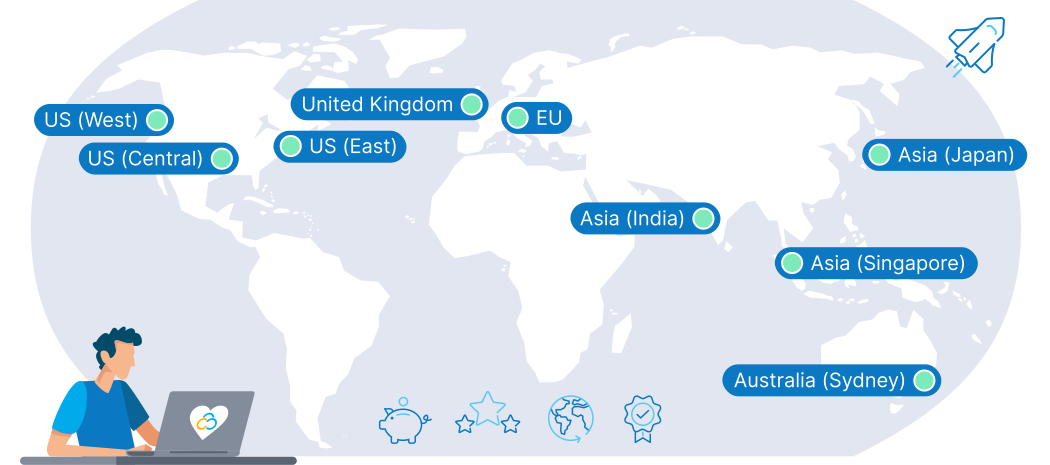
9 Regions, 11 Locations, Global Availability
Why Choose Windows VPS Hosting?
Windows App Support
Run essential Windows-based applications like .NET and ASP.NET, ensuring smooth execution and straightforward deployment.

Integrated Active Directory
Enjoy the convenience of integrated Active Directory, simplifying authentication, user identities, and access management.

Remote Desktop Access
Stay connected from anywhere with secure Remote Desktop access, facilitating remote work and efficient server management.

Scalable Resources
Effortlessly scale up or down on resources like CPU, RAM, and storage - perfect for handling SharePoint and SQL Server databases.

Consistent Environment
Maintain a uniform Windows environment across your infrastructure, enhancing compatibility and streamlining deployment and maintenance.

Maximize Windows Expertise
Harness your team's existing familiarity with Windows OS to streamline server setup and management without a steep learning curve.
What are the main advantages of a Windows VPS vs. Linux equivalents?
Licensing
Windows provides volume licensing and enterprise features that can be more cost-effective than Linux for larger setups.
Development
Windows is proprietary, offering a unified environment. Linux is open-source and customizable, but requires more expertise.
Configuration
Windows primarily uses a GUI, making it user-friendly. Linux is more efficient via CLI, but with a learning curve.
Installation
Windows employs user-friendly installer-based software setup. Linux uses more complex package managers.
Performance
Windows integrates well with its ecosystem of tools and apps. Linux sacrifices integration for greater efficiency.
File Systems
Windows enhances compatibility and streamlined data management within its ecosystem, boosting reliability.
Available Windows Distributions
Windows Server 2025
- All Win Server 2019 & Win Server 2022 Features
- Hotpatching – No reboot updates
- Credential Guard – Secure logins
- Accelerated Networking – Faster VMs
- NVMe Optimization – Speed boost
- Hybrid Cloud – Azure-ready
- Admin Center – Better management
- Cloud-Init – Fast deployment
Windows Server 2022
- All Windows Server 2016 Features
- All Windows Server 2019 Features
- Secured-Core-Technology
- DNS-over-HTTPS (DoH)
- Microsoft Edge browser
- Upgraded Hyper V Manager
- Enhanced Storage Replication
Windows Server 2019
- All Windows Server 2012R2 Features
- All Windows Server 2016 Features
- Advanced Threat Protection
- Windows Admin Center
- Kubernetes support
- Device Guard
- Kernel soft reboot
Windows Server 2016
- All Windows Server 2012R2 Features
- Windows Defender
- Windows Powershell 5.0
- Network Controller
- IP Address Management (IPAM)
Apps and Deployment Options for Your Windows VPS

Plesk

Docker

Windows Admin Center
IIS Manager
Powerful Configurations for your Windows VPS
Remote Desktop
Remote Desktop
Secure remote access with responsive performance and seamless connectivity.
Mail Server
Mail Server
Enhance your communication with high-volume mail handling and excellent reliability.
Meta Trading
Meta Trading
Transform your trading with rapid execution, ideal for high-frequency trading.
App Development
App Development
Supercharge app development and testing with high-capacity resources for demanding tasks.
Database Hosting
Database Hosting
Optimize database performance with high-speed access. Perfect for handling large, complex data sets.
eCommerce Store
eCommerce Store
Support high traffic and transaction volumes for your store with reliable processing power.
These are just a few sample configurations. You can browse Contabo's product portfolio of Virtual Private Servers (VPS), Virtual Dedicated Servers (VDS), Dedicated Servers or check our pricing page for a full overview.
Why host your Windows VPS with Contabo?

Pricing & Flexibility
Start affordably with a cheap Windows VPS server and scale easily on your terms. Even without a managed Windows VPS, our team and tutorials have you covered.

Network & Connectivity
Deploy near your users or choose an offshore Windows VPS for data or jurisdiction flexibility. Our global network delivers fast, stable connections with low latency.
Security & Compliance
Run a secure Windows VPS with secured images, access control, and built-in DDoS mitigation. GDPR-compliant protections keep workloads safe on Windows Cloud VPS hosting.

Backup & Recovery
Protect data with snapshots or our Auto Backup add-on for extra security. Ideal for unmanaged Windows VPS hosting, keeping your VPS dependable.

Performance & Scalability
Power apps with Windows SSD VPS plans optimized for quick boots and rapid data access. Scale CPU, RAM, and storage on demand to match your workload.

Uptime Commitment
Reliable, monitored infrastructure ensures 99.9% uptime around the clock. Your services stay online and responsive when it matters most.
Trusted by Thousands Worldwide
See Why Customers Love Contabo




First-class Customer Support
A premium support experience for every customer is one of our cornerstones. Our team of highly-trained human support agents is here to help you 24/7, 365 days a year. We believe in offering many ways to find a solution, so you can get help instantly via live chat, explore our extensive self-support resources, or learn from our practical tutorial videos.
You don't have to take our word for it - our customers agree, with thousands of reviews earning us a 4.3 score on Trustpilot.
Learn more about the Contabo Support Experience.
Windows VPS FAQs
Windows VPS FAQs
What is a Windows VPS?
How can I benefit from Contabo's Windows VPS hosting for my business?
How can I benefit from Contabo's Windows VPS hosting for my business?
What makes Contabo's Windows VPS hosting a good choice for developers?
What makes Contabo's Windows VPS hosting a good choice for developers?
Can I host multiple websites on my Contabo Windows VPS?
Can I host multiple websites on my Contabo Windows VPS?
What payment methods are available?
What payment methods are available?
Can I change my VPS specs?
Can I change my VPS specs?
Can I upgrade to a different VPS plan later?
Can I upgrade to a different VPS plan later?
Are these servers unmanaged, semi-managed, or managed?
Are these servers unmanaged, semi-managed, or managed?
Linux vs Windows VPS - which is better?
Linux vs Windows VPS - which is better?
How do I pick the right server from the options above?
How do I pick the right server from the options above?
Can I use my own Windows license?
Can I use my own Windows license?
Can I use unified management tools like Microsoft System Center with these servers?
Can I use unified management tools like Microsoft System Center with these servers?
Can I run mail software like Outlook on a Windows VPS from Contabo?
Can I run mail software like Outlook on a Windows VPS from Contabo?
How to install a Windows Server on a Contabo VPS?
How to install a Windows Server on a Contabo VPS?
How to set up a VPS server on Windows?
How to set up a VPS server on Windows?
How to secure a Windows VPS?
How to secure a Windows VPS?
Windows VPS Guides

Learn how to configure a software firewall in both Linux and Windows to keep your VPS secure.
Discover the full guide in How to Setup a Software-Firewall in Linux and Windows

Understand why backups are crucial and how to create them effectively on your Windows Server.
Find step-by-step instructions in How to Create a Windows Server Backup
Get an overview of new features, system requirements, and more coming with Windows Server 2025.
Explore all details in Windows Server 2025: Key Features, Upgrades, and What to Expect