





























Host Your Own AI Agent with OpenClaw - Free 1-Click Setup!

icon_plane

MAIL SERVERS

Host Your Own Affordable Email Server

Streamline your email setup with customizable settings, top-tier security, and cost-effective plans. Keep your data protected and control your communications with a self-managed mail server.

main_mail-server

Build Your Ideal Mail Server Setup

Choose from a variety of server configurations and Add-Ons to create the mail server that suits your needs. Start with a recommended configuration below or customize your own.
Icon for VDS CLOUD VPS 6

Plesk License Included

€7.50
6
00 / month
✔️
6 vCPU Cores
12 GB RAM
200 GB SSD More storage available
2 Snapshots
300 Mbit/s Port
Unlimited Traffic*
Icon for VDS CLOUD VPS 8

Ubuntu Included

€14.00
11
20 / month
✔️
8 vCPU Cores
24 GB RAM
300 GB SSD More storage available
3 Snapshots
600 Mbit/s Port
Unlimited Traffic*
Icon for VDS CLOUD VPS 12

cPanel License Included

€25.00
20
00 / month
✔️
12 vCPU Cores
48 GB RAM
400 GB SSD More storage available
3 Snapshots
800 Mbit/s Port
Unlimited Traffic*

9 Regions, 11 Locations, Global Availability
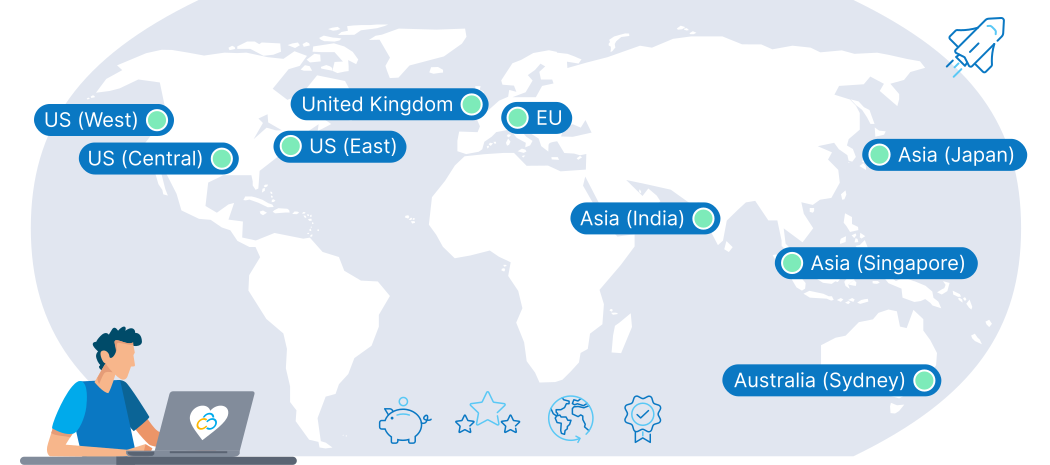
Choose a Data Center near you to ensure low latency, regulatory compliance, and full control of your email data at all times.
Map Location en

Self-Hosted vs. Managed Hosting for your Mail Server

While managed hosting may suit those with less technical skill, self-hosting your own mail server offers many benefits for experienced users, including better security and data sovereignty.

Security & Ownership


With a self-hosted mail server, you control security and data ownership, enabling more customization if you have the skills.


Managed hosting suits those lacking technical expertise but offers limited customization options.

Access & Dependencies


Hosting your own server allows for continuous access without relying on external services.


Managed hosting makes things easier by outsourcing server management but depends on the provider’s reliability.

Expertise Required


Hosting your own mail server demands technical expertise for setup, maintenance, and security.


Managed hosting is more suitable for those who prefer to avoid technical tasks, as the provider handles these aspects.

How To Set Up Your Mail Server with Contabo

mailserver_steps

Domain Name & DNS

Choose a domain name representing your brand and configure DNS settings to link your domain with your server.

Security & Encryption

Install SSL/TLS for data encryption and set up a firewall to protect against unauthorized access and keep your server safe.

Server Management

Manage storage, create email accounts, and define protocols (IMAP, SMTP, POP3) to ensure efficient email operations.

Monitoring & Logging

Monitor server performance regularly and maintain logs to track activity, enhance security, and optimize.

Why Use a Contabo VPS for your Mail Server?

Uptime
Reliable Uptime High uptime ensures your mail server is always available, maintaining constant communication without interruptions.
icon_privacy
Dedicated Environment Enjoy a dedicated setup where resources are exclusively yours, boosting both performance and security.
icon_network
High Network Capacity Ample bandwidth supports heavy traffic, allowing for smooth sending and receiving of large email volumes at all times.
Icon Security alt
Security & Compliance

Our  always-on DDoS protection  offers 24/7 protection. Our infrastructure is also fully GDPR compliant.


icon_support
24/7 Support Get expert support at any time to resolve issues quickly, keeping your communications running smoothly.
icon scalability

Scalability

Easily upgrade resources as your needs grow. Add more CPU, RAM, or storage quickly and easily, without changing your entire hosting setup.

logo_small_mailcow
Mailcow
logo_small_postfix
Postfix
logo_small_dovecot
Dovecot
logo_small_exim
exim
logo_small_ms-exchange
Microsoft Exchange
logo_small_mailenable
Mailenable

Trusted by Thousands Worldwide

190
Countries Served
225,000+
Customers Worldwide
25,000+
Mail Servers
22 Years
In business

See Why Customers Love Contabo

Frequently Asked Questions about Mail Servers

FAQs | More information on Mail Server hosting using a Contabo VPS
How can my business benefit from hosting my own email server?

Hosting your own mail server on a Contabo VPS provides you with control over your email infrastructure, enhancing security, scalability, and performance. It's ideal for businesses that require customized email solutions and comprehensive data control.


Learn more about  self-hosted mail servers .

How do I ensure my mail server on a Contabo VPS is GDPR compliant?

GDPR compliance on a Contabo VPS involves using encryption for data transmissions, implementing secure data storage practices, and maintaining clear policies for user data management. Contabo supports these efforts by providing fully GDPR-compliant infrastructure - the rest is up to you.

What security measures should I consider for my mail server?s

To secure your self-hosted mail server on a Contabo VPS, start by implementing essential security measures:


Contabo also provides additional security features like  always-on DDoS protection  to enhance your server's security.


A variety of anti-spam software is also available such as Amavis, SpamAssassin & ClamAV. A free version of SpamAssassin is included with a Plesk license (available as an Add-On to your Contabo mail server).


Can I scale my mail server hosting as my company grows?

Yes, it's easy to adjust resources such as storage and processing power or upgrade to a more powerful VPS using the Customer Control Panel. This flexibility ensures that your mail server can grow with your business, accommodating increasing email traffic and storage needs.

How can I migrate my existing mail server to a Contabo VPS?

To migrate your existing mail server to a Contabo VPS, you'll need to manually transfer your email configurations, accounts, and data. It's important to plan for a smooth transition, which includes backing up all data, configuring your mail server software on the VPS, and testing thoroughly to ensure everything operates as expected before going live.

How do I choose the right email client for my mail server?

Selecting the right email client boosts productivity and user experience. Compatibility with your mail server software is essential for seamless integration and making the most of your server’s features.


Outlook and Thunderbird are well-known choices, but exploring various clients ensures you find the best fit for your setup. Options like Apple Mail integrate smoothly with iOS and macOS, while Gmail offers comprehensive cloud services and a wide range of plugins. Clients like eM Client and Mailspring provide modern interfaces and flexibility, helping you match the email client to your specific needs effectively.

How do I host an email address on a Contabo server?

First, choose your domain name and ensure it's properly registered and linked to your server through DNS settings. Install and configure email server software such as Microsoft Exchange, Postfix, or Exim, which allows you to create and manage email addresses. Set up the necessary MX and A records in your DNS to direct email traffic to your server, ensuring your hosted email addresses are ready to send and receive emails effectively.

How do I store emails?

Storing emails effectively involves configuring your mail server's storage options to handle the volume and security of the data. On a Contabo VPS, you can choose from various storage solutions like SSDs for fast access or HDDs for larger capacities. Implement database management systems such as MySQL or PostgreSQL to organize emails and make retrieval efficient. Additionally, ensure that your emails are backed up regularly to prevent data loss and use encryption to secure email data both at rest and in transit.

How do I manage my company's email addresses?

Managing your company’s email addresses on a mail server involves setting up a centralized email management system on your server. Utilize email server software that allows for easy addition, deletion, and modification of email accounts. Implement administrative controls to set permissions and roles, and use groups to manage email policies and distribution lists effectively. Regularly update your email settings to reflect changes in your organization and ensure all communications align with your company’s operational requirements.

What are the differences between IMAP, SMTP, and POP3 protocols?

IMAP, SMTP, and POP3 are three key protocols used in the handling of email.


  • IMAP (Internet Message Access Protocol) allows for email messages to be read and managed on the server, enabling access from multiple devices while keeping the emails on the server.
  • SMTP (Simple Mail Transfer Protocol) is used for sending emails from your server to another, ensuring messages are properly routed between servers.
  • POP3 (Post Office Protocol version 3) is used for downloading emails from the server to the client, removing them from the server once downloaded.


Each protocol serves different needs; IMAP is ideal for accessing emails from various locations, SMTP is essential for email delivery, and POP3 is suited for those who need to access their mail offline.