
























































































Core VPS
 Free Firewall & DDoS Protection Unlimited Traffic 99.9% Uptime
 Cloud VPS 4
- •4 vCPU Cores
- •8 GB RAM
- •100 GB SSDMore storage available
- •1 Snapshot
- •200 Mbit/s Port
- •Unlimited Traffic*
Cloud VPS 6
- •6 vCPU Cores
- •12 GB RAM
- •200 GB SSD More storage available
- •2 Snapshots
- •300 Mbit/s Port
- •Unlimited Traffic*
Cloud VPS 8
- •8 vCPU Cores
- •24 GB RAM
- •300 GB SSDMore storage available
- •3 Snapshots
- •600 Mbit/s Port
- •Unlimited Traffic*
Cloud VPS 12
- •12 vCPU Cores
- •48 GB RAM
- •400 GB SSDMore storage available
- •3 Snapshots
- •800 Mbit/s Port
- •Unlimited Traffic*
Cloud VPS 16
- •16 vCPU Cores
- •64 GB RAM
- •500 GB SSDMore storage available
- •3 Snapshots
- •1 Gbit/s Port
- •Unlimited Traffic*
Cloud VPS 18
- •18 vCPU Cores
- •96 GB RAM
- •600 GB SSDMore storage available
- •3 Snapshots
- •1 Gbit/s Port
- •Unlimited Traffic*
Want more Power? Go with a Performance VPS
Cloud VPS Built for what Your Workload Actually Needs

VPS for Web Hosting and CMS
WordPress sites, Joomla installs, Drupal builds, and static-site stacks run reliably on Core VPS. Plans from 8 GB RAM and 100 GB storage handle multiple sites with room to grow, and your server stays stable through traffic peaks with 99.9% uptime.

Private Email and File Server VPS
Self-hosted email stacks like Mailcow, Mail-in-a-Box, and Postfix run well on Core VPS plans with 12 to 24 GB RAM. The same applies to Nextcloud, Seafile, and Samba file servers. Reliable uptime, predictable resources, and full root access.

Backup, Archive, and Storage VPS
Core VPS plans include the option to double capacity through Storage Extension, up to 1.2 TB on the top tier. Backup jobs, off-site archives, and cold-storage workloads benefit most from storage capacity and stable bandwidth.

VPS for Development Environments
Use Core VPS for a feature branch, a staging environment, or a CI/CD runner. Custom images, cloud-init, and SSH keys keep setup simple. Low prices mean dev teams can run more environments in parallel rather than spending on unnecessary hardware.
Core VPS vs. Performance VPS: When to Choose Which
Core VPS
The Best Value VPS on Earth
Ideal for:
- Standard workloads with predictable resource needs
- Web apps, small databases, and general-purpose hosting
- Budget-sensitive projects needing proven hardware
- Teams who value cost-efficiency over raw speed
Performance VPS
Best Performance VPS for Modern Projects
Ideal for:
- Compute-focused workloads that push CPU and NVMe
- Databases, API services, and AI-ready workloads
- Production environments that need more headroom
- Projects that demand high-end hardware
Cloud VPS Plans from €4.40/Month

Reliable Performance at the Lowest Entry Price
Multiple vCores and generous RAM on every plan. Built for budget-conscious small businesses, hobbyists, and developers.

No Hidden Costs or Billing Surprises
One monthly price covers the resources, the network, and the platform. Save even more with long-term subscriptions.

Production Essentials with Every Plan
DDoS protection, Firewall, dedicated IPv4 and IPv6, and the Customer Control Panel come standard, with Auto Backup as an affordable Add-On.
Trusted by Thousands Worldwide








FreeBSD


openSUSE

AlmaLinux

RockyLinux

cPanel



Deploy Your Perfect Image
With Custom Images, you can instantly deploy your .iso or .qcow2 image via web UI or API.
What Makes Core VPS from Contabo the Best-Priced VPS on the Market?

Free Security Features Come Standard
Always-on DDoS protection and a free Firewall come with every Cloud VPS plan. You can easily configure the baseline protection layer you need through your Customer Control Panel.
Reliable Performance for Lighter Workloads
Proven server hardware for web hosting, email servers, and dev environments. Pick the storage tier you need from 100 GB to 600 GB, and double it any time with a Storage Extension.

Unlimited Traffic Included with Every Plan
Every Cloud VPS plan comes with unlimited inbound and outbound data transfer. Port speeds run from 200 Mbit/s up to 1 Gbit/s. Fair usage policies apply.
Auto Backup and Snapshots for Easy Recovery
Auto Backup runs daily off-server backups so an accident doesn't take your data with it. Snapshots allow you to capture your server's state and roll back instantly.

DNS and Domain Management Made Simple
Manage DNS records directly from the Customer Control Panel. Buy a new domain or transfer an existing one and point it at your Cloud VPS in a few clicks.

Flexible Networking and Custom IP Options
Dedicated IPv4 and IPv6 addresses come with every plan. Add more IPs as your project grows and build private networks with unlimited internal traffic for multi-server setups.

Production-Ready Deployment Tools for DevOps Teams
Custom images, cloud-init, SSH keys, and CI/CD pipeline support work with all plans. Solo developers and small teams get the features they actually use, without paying hyperscaler markup.

Fast Provisioning in Minutes for Your VPS
Provision your Cloud VPS in minutes through the Contabo API or the CLI, and scale on demand. In a few clicks from configuration and payment, the server's live before your coffee gets cold.

Intuitive Web UI for Server Management
Manage your Cloud VPS from the Customer Control Panel. Adjust Firewall settings, manage snapshots, configure networking, and upgrade or reinstall your server with ease.
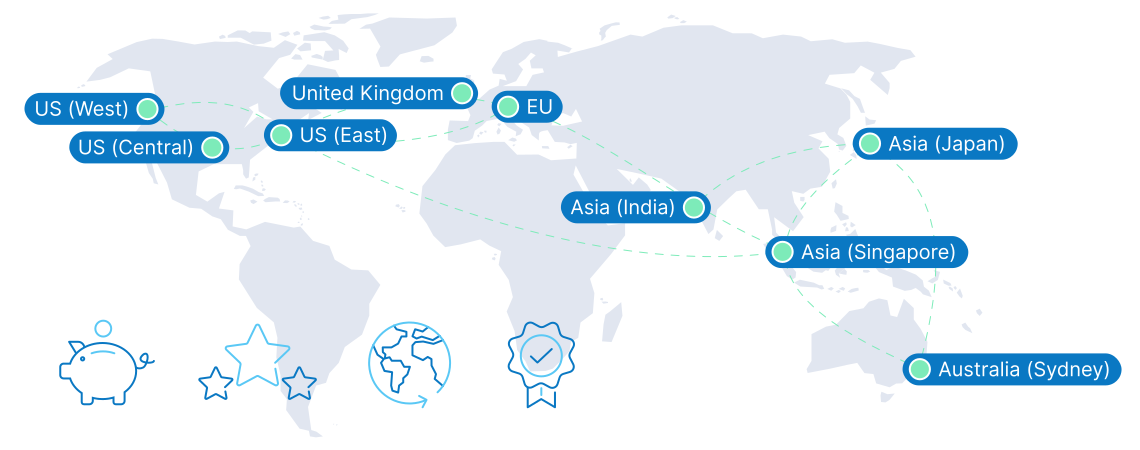
9 Regions, 11 Locations, Global Availability
Core VPS FAQs
What hardware and CPU does Core VPS from Contabo use?
Who is Core VPS best for?
How does Contabo Cloud VPS pricing compare to other European providers?
Can I upgrade from Core VPS to a higher tier later?
What operating systems can I run on my Cloud VPS?
Which projects and applications can I use a Cloud VPS for?
How do I configure my Cloud VPS after purchase?
What payment methods are available?
Do you offer hosting panels for VPS?
Cloud VPS Guides

VPS essentials explained simply: what it is, how it works, and when to use it.
New to VPS? Get your introduction in What is a VPS? A Beginner-Friendly Guide to Contabo’s Virtual Private Servers

A clear side-by-side comparison to pick the right hosting for your next project.
Not sure which fits your project best? Read Cloud Hosting vs VPS Hosting: Features, Benefits, and Differences Explained

Turn infrastructure into revenue. Learn about pricing tips, packaging, and operational best practices.
Explore the step-by-step playbook in How to Run VPS Reseller Hosting: A Complete Guide for 2025
The price displayed is the effective monthly rate for a 24-month subscription including applicable taxes.
Minimum initial contract length: 1 month | Minimum following contract length: Equal to the initial contract length | Minimum cancellation notice: None (pre-paid) or 4 weeks (post-paid).
Incoming Traffic: Unlimited and unmetered. No extra charges apply. | Outgoing Traffic: Unlimited - fair usage policy applies based on average server workloads. To maintain fair network performance for all customers, Contabo reserves the right to throttle servers with exceptionally high or disruptive usage patterns.
Applications and Add-Ons: Contabo provides full technical assistance for the Contabo VPS itself - including the network, hardware, and initial setup of any 1-click Add-Ons. Any additional open source software included in the applications is owned by the respective provider - maintenance, upgrading, and troubleshooting are within the end-users responsibility.