
























































































Ollama Phi VPS Hosting
Self-Hosted Ollama Phi: Private AI on Your VPS
 Free 1-Click Ollama + Phi-4 Image Built-In Web UI Full Data Sovereignty
 Run Microsoft's Phi-4 on a private Contabo VPS, where the 1-click image sets up Ollama and a web UI for you. Log in, start chatting, and keep every prompt on your own server
Ollama Phi
Personal Use
Ollama Phi
Personal Use
Perfect for running your own private Phi-4 assistant.
4 vCPU Cores
8 GB RAM
100 GB SSD
Auto Backup available
Ollama Phi
Power User
Ollama Phi
Power User
Great for everyday use with faster, smoother responses.
12 vCPU Cores
48 GB RAM
400 GB SSD
Auto Backup available
Ollama Phi
Team Deployment
Ollama Phi
Team Deployment
Ideal for n8n workflows and multiple users at once.
18 vCPU Cores
96 GB RAM
600 GB SSD
Auto Backup available
Ollama Phi
Enterprise Scale
Ollama Phi
Enterprise Scale
Maximum power for teams running heavy AI workloads.
12 Virtual Cores
48 GB RAM
360 GB NVMe
What is Ollama Phi?
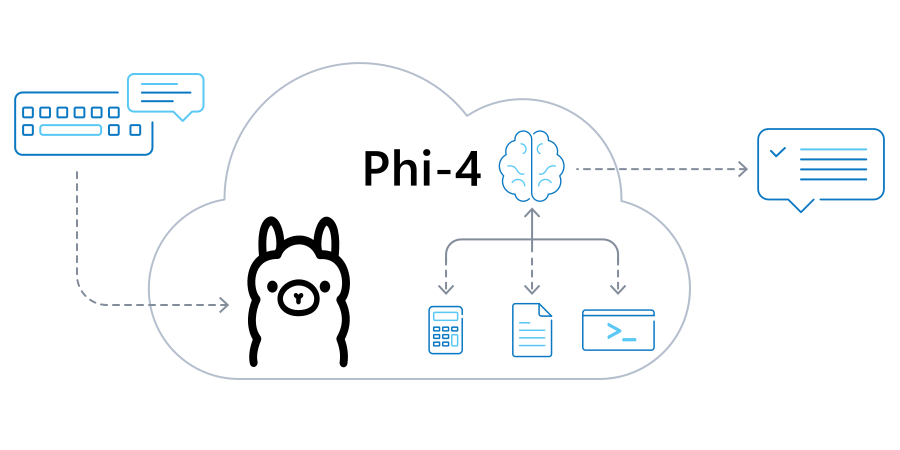
Ollama is a tool that downloads and runs language models on your machine instead of sending your prompts to someone else's cloud. Phi is Microsoft's family of small language models, built to be lightweight and efficient enough to run on modest hardware. Put them together and you get Ollama Phi: a private setup where the Phi-4 model lives on your server and answers entirely offline once it's downloaded.
The Phi-4 model is good at a few things in particular. It's strong at math and logical reasoning. It also pulls structured data out of messy text and helps with coding and scripting. Because everything runs on hardware you control, your prompts and outputs never leave the box, which is the main reason people pick the Ollama Phi model for private or self-hosted AI work.
Why Host Ollama Phi on VPS?

Always-On Ollama Server
Your Ollama server stays up 24/7 for assistants, internal apps, and quick experiments. You control how it runs, with reliable uptime and no managed AI platform in the middle.

Choose the Right Phi Model
Ollama lists more than one Phi model. The lighter phi4-mini answers fast on modest specs, while the full Phi-4 trades speed for stronger reasoning. Choose according to your workload.

Private AI Infrastructure
Start with light Phi testing on a smaller Ollama VPS, then scale up without reinstalling anything as you add agents, long-running tools, and a real self-hosted AI service.
Get Started in Minutes with Ollama on a Contabo VPS
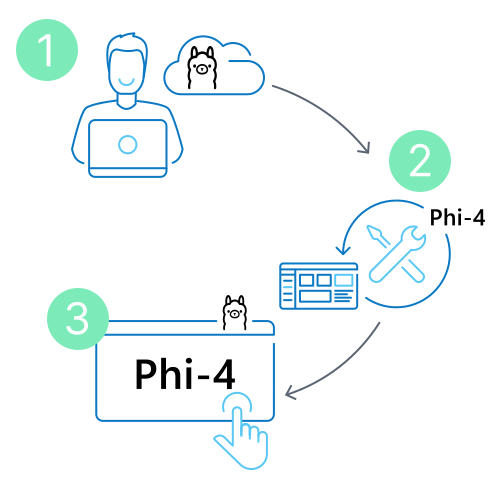
Step 1: Choose your VPS
Pick a plan with at least 16 GB of RAM so Phi-4 has room to run. Cloud VPS 30 is the entry point, and you can size up anytime.
Step 2: Deploy the 1-click image
Select the Ollama Phi image when you order, or add it later from the Customer Control Panel. It installs Ollama, a web UI, and the Phi-4 model for you. Allow up to 30 minutes for everything to finish.
Step 3: Log in and start chatting
Open your server's web address, sign in with the admin credentials from your order, and you land straight in the chat window. That's it. Your private Phi-4 assistant is ready!
What Can You Build with Ollama VPS Hosting?

Ollama Server for Developer Tools and Apps
This is real infrastructure. Point your scripts and internal apps at the Ollama server and let Phi-4 handle coding help, data extraction, and reasoning, all through a local API that never sends a prompt outside your box.

n8n and Self-Hosted AI Workflows with Ollama
Connect Ollama to n8n and Phi-4 goes from a chat model to running self-hosted AI workflows. Route incoming prompts, summarize documents, or tag data automatically, with every step running privately on your own server.
What Can You Integrate with Ollama?

n8n

OpenClaw

Coding Agents

Chat Interfaces

Internal Apps via the Ollama API
Why Self-Host Ollama Phi on the Contabo Cloud?

Best Price-to-Performance
Running an LLM around the clock gets expensive on managed AI platforms that bill per token and per hour. A Contabo VPS swaps that for one flat monthly cost, with the generous RAM and storage.

World-Class Infrastructure
Firewall, snapshots and optional Auto Backup keep your setup safe. When your Ollama server outgrows its first plan, upgrade in-place and keep scaling toward a full self-hosted AI stack.
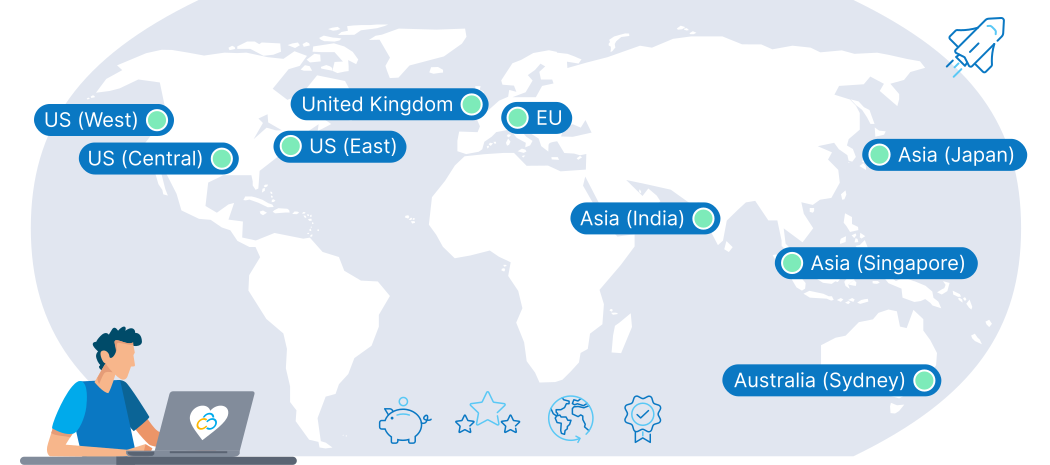
9 Regions, 11 Locations, Global Availability
Trusted by Thousands Worldwide
The price displayed is the effective monthly rate for a 12-month subscription including applicable taxes.
Minimum initial contract length: 1 month | Minimum following contract length: Equal to the initial contract length | Minimum cancellation notice: None (pre-paid) or 4 weeks (post-paid).
Incoming Traffic: Unlimited and unmetered. No extra charges apply. | Outgoing Traffic: Unlimited - fair usage policy applies based on average server workloads. To maintain fair network performance for all customers, Contabo reserves the right to throttle servers with exceptionally high or disruptive usage patterns.
Applications and Add-Ons: Contabo provides full technical assistance for the Contabo VPS itself - including the network, hardware, and initial setup of any 1-click Add-Ons. Any additional open source software included in the applications is owned by the respective provider - maintenance, upgrading, and troubleshooting are within the end-users responsibility.
Ollama Phi FAQs
What is Ollama VPS hosting?
Which Phi model should I run on a VPS?
How do I install Ollama on Ubuntu 24.04?
How do I run Ollama on a VPS?
Why is Contabo a good fit for Ollama VPS hosting?
Can I use Ollama as a server for internal tools?
Can I use n8n with Ollama on a VPS?
What is Ollama Cloud vs self-hosted Ollama?
What are the Phi model names in Ollama?
How much VPS resource do I need for Phi-4 or Phi-4-mini?
Ollama Phi Guides

Learn what Ollama is and how to use it with an n8n VPS. Run local LLMs without API costs, keep data private, and build automated AI workflows: What Is Ollama and How To Use it with n8n

Ollama vs LocalAI: which OpenAI-compatible local LLM server wins on speed, models, and GPU support? Compare both and self-host on a VPS: Ollama vs LocalAI: Best Self-Hosted OpenAI-Compatible LLM Server