
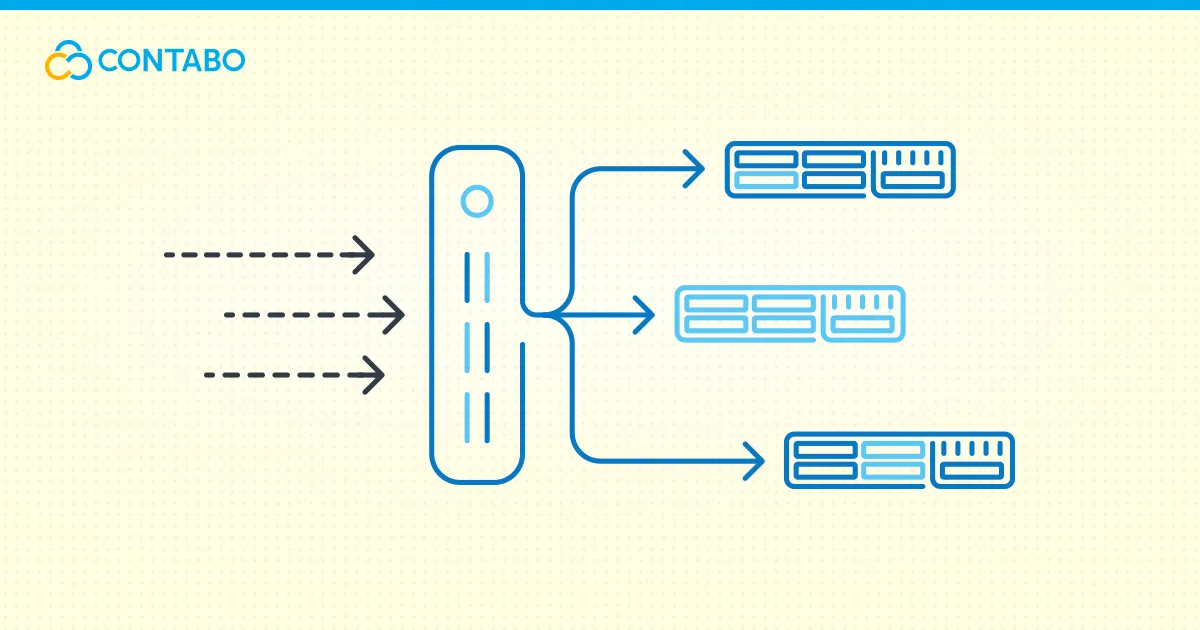
A load balancer is a system that distributes incoming network traffic across multiple servers so no single server gets overwhelmed. It improves performance, keeps applications available when a server fails, and lets you scale by adding more servers. Load balancers come in hardware and software forms, operate at Layer 4 or Layer 7, and use algorithms like round robin and least connections to decide where each request goes.
If your website or application is growing, one server eventually becomes the bottleneck, and visitors see slow pages or errors. A load balancer solves this through load balancing: it sits in front of several servers and spreads requests across them. This guide explains what a load balancer is, what load balancing does, how it works, the types, and how to set one up.
What Is a Load Balancer?
A load balancer is a device or piece of software that receives client requests and forwards them to one of several backend servers. Each backend runs a copy of your application, so any of them can answer a request, and the load balancer stops sending traffic to servers that are down. The simplest load balancer definition: it is a traffic director that spreads visitors across a pool of servers that grows with demand.
What Does a Load Balancer Do?
The core use of a load balancer is request distribution, but it does more than split traffic. The purpose of a load balancer is to keep your application available no matter which backend answers. A load balancer health check probes each backend at a set interval and pulls failing servers out of rotation, which is what makes high availability work. SSL termination handles encryption and decryption centrally, freeing backends from that cost. A sticky session load balancer, using a session persistence setup, keeps a user on the same backend when session state lives on the server rather than in a shared store.
Why Load Balancers Matter in 2026
Load balancers keep performance and uptime steady under pressure. Picture an online store on a busy sales day: thousands of users arrive at once, and without a load balancer a single server can crash, causing lost revenue. By distributing requests, a high availability load balancer keeps the store reachable and reroutes around any failure. The load balancer benefits are clearest for platforms that cannot afford to go down:
- High-traffic websites, to prevent crashes and slowdowns
- Cloud applications, to maintain availability
- APIs and microservices, to optimize request handling
- E-commerce platforms, to handle peak traffic smoothly
- Streaming and gaming platforms, to reduce latency
How Does a Load Balancer Work?
Understanding how a load balancer works comes down to three steps. A client sends a request to the load balancer’s address, the load balancer selects a healthy backend using a configured algorithm, and that server processes the request and returns the response. Clients only ever see the balancer’s address while the backends stay private, which also improves security, and any server that fails its health check stops receiving new requests until it recovers.
Common Load Balancing Algorithms
The algorithm decides how a load balancer works at the moment of choosing a server, and most software load balancers let you pick one per backend pool. For the basics of round robin, least connections, and IP hash, our beginners guide to load balancers covers each. The table below adds the weighted and response-time variants.
| Algorithm | How it works | Best for |
|---|---|---|
| Round robin | Sends each new request to the next server in order | Backends with roughly equal capacity |
| Weighted round robin | Round robin, but stronger servers get a larger share | Mixed hardware where some servers are bigger |
| Least connections | Routes to the server with the fewest active connections | Long-lived connections of uneven length |
| Weighted least connections | Least connections adjusted for server capacity | Uneven hardware with variable session length |
| Least response time | Picks the server answering fastest right now | Latency-sensitive apps where speed varies |
| IP hash | Maps a client IP to a fixed server | Keeping a user on one server without cookies |
| Random | Selects a server at random, sometimes weighted | Large pools where simple spread is enough |
Round robin load balancing is the common default, weighted round robin load balancing helps when servers differ in size, and IP hash gives basic session stickiness.
Types of Load Balancers
The main load balancer types split along two lines: how they are delivered (hardware or software) and what they read to make decisions (Layer 4 or Layer 7). On top of those sit cloud and global variants.
Hardware vs Software Load Balancers
A hardware load balancer is a physical appliance built to move traffic at high throughput with low latency. These devices are fast and reliable but expensive, and you provision capacity ahead of demand. A software load balancer runs as a program on a standard server or virtual machine, where tools like NGINX and HAProxy live. A virtual load balancer is the same idea packaged as a VM image you deploy yourself. Software options are flexible, cost-effective, and fit cloud and VPS environments well, which makes a software load balancer the practical choice for most websites.
Layer 4 vs Layer 7 Load Balancers
The split between an L4 load balancer and an L7 load balancer comes from the OSI model. A Layer 4 load balancer, also called a network load balancer, routes by IP address and TCP or UDP port without reading the traffic itself, which makes it fast and protocol-agnostic. A Layer 7 load balancer, often called an application load balancer, reads the request itself: the URL, headers, and cookies. That lets it route `/api` traffic to one pool and `/images` to another, terminate SSL, and apply content-based rules, at the cost of more processing per request. You can find more details in our article on Layer 4 vs Layer 7 Load Balancers.
Global Server Load Balancers (GSLB) and DNS Load Balancing
A global load balancer, or GSLB load balancer, distributes traffic across data centers in different regions rather than servers in one location, sending each user to the nearest or healthiest site so the service survives a whole-region outage. DNS load balancing is the most common way to do this: a DNS load balancer returns different IP addresses for one hostname based on location or server health.
Cloud Load Balancers
A cloud load balancer is a managed service from a hosting or cloud provider. Sometimes branded as load balancer as a service, it removes the work of installing and maintaining the balancer yourself. Load balancing in cloud computing usually means the provider runs and scales the balancer and bills it within your plan. The choice between a managed cloud balancer and a self-hosted one comes down to control versus convenience.
Load Balancer vs Reverse Proxy vs API Gateway
These three terms overlap and often run on the same software, so the reverse proxy vs load balancer question and the API gateway vs load balancer line come up constantly. A reverse proxy forwards requests to backends and can add caching, compression, and SSL. A load balancer is a reverse proxy whose main purpose is spreading traffic across many backends with health checks. An API gateway adds authentication, rate limiting, and routing.
| Tool | Primary job | Typical extras |
|---|---|---|
| Reverse proxy | Forward requests to a backend | Caching, SSL, compression |
| Load balancer | Spread traffic across many backends | Health checks, algorithms, failover |
| API gateway | Manage and secure API traffic | Auth, rate limiting, request transformation |
In practice one tool such as NGINX can act as all three. The distinction is about intent. You can read more in our article Load Balancer vs Reverse Proxy: What’s the Difference?
Horizontal vs Vertical Scaling: Where Load Balancers Fit
When an application outgrows its server, you have two ways to add capacity, and the horizontal vs vertical scaling decision shapes whether you need a load balancer.
| Approach | What you do | Load balancer needed? |
|---|---|---|
| Vertical scaling | Add CPU, RAM, or disk to one server | No, it is still one machine |
| Horizontal scaling | Add more servers to share the load | Yes, to distribute traffic across them |
Vertical scaling is simpler but has a ceiling and remains a single point of failure. Horizontal scaling has no hard ceiling and removes that single point of failure, but only if something distributes traffic across the new servers: the load balancer.
When Do You Need a Load Balancer?
Knowing when to use a load balancer comes down to two triggers: a single server can no longer handle your traffic reliably, or downtime becomes too costly to risk one machine failing. Common load balancer use cases include high-traffic websites, APIs serving many clients, and microservices, where a load balancer routes requests to healthy instances and lets you deploy updates without downtime.
Choosing the Right Load Balancer for Your Hosting Setup
Choosing the best load balancer starts with where it will run and how much traffic it handles. A few options dominate in practice. NGINX is widely used for web applications, being lightweight, powerful, and free. HAProxy delivers enterprise-grade performance for high-demand environments, and for global redundancy a DNS-based service such as Cloudflare’s load balancer distributes traffic worldwide. A load balancer for a VPS is the common case: a software load balancer such as NGINX or HAProxy on its own instance gives you a capable web server load balancer for very little cost, and VPS load balancing scales as you add backends. You can explore other available options in our article Best Open Source Load Balancers in 2026.
How to Set Up a Load Balancer with NGINX
Setting up NGINX as a load balancing system involves a few straightforward steps. Here’s a basic example to distribute traffic between two backend servers:
- Install NGINX:
sudo apt update && sudo apt install nginx -y - Edit the NGINX configuration file:
sudo nano /etc/nginx/nginx.conf - Define backend servers in the configuration:
http { upstream backend_servers { server 192.168.1.101; # Backend Server 1 server 192.168.1.102; # Backend Server 2 }
server {
    listen 80;
    location / {
        proxy_pass http://backend_servers;
    }
}

} - Restart NGINX to apply changes:
sudo systemctl restart nginx Watch Our YouTube Video Walkthrough
You can also follow along visually with our step-by-step tutorial on our YouTube:
Load Balancing on Contabo VPS
There is no dedicated Contabo load balancer product available at this moment. The practical route today is to run a software load balancer such as NGINX on one VPS and point it at two or more backend instances, exactly as shown in the NGINX setup above. Add backend instances as your traffic grows, and the same upstream configuration scales with them. This gives you full control over the algorithm, health checks, and SSL handling on infrastructure you already manage.
Conclusion
A load balancer turns a single fragile server into a resilient pool, spreading traffic so your application stays available as it grows. Match the type to your needs: software for flexibility, Layer 7 for content-aware routing, GSLB for multiple regions. Decide whether you are scaling up or out, and the right load balancer follows from there.
Load Balancer FAQ
What is a load balancer in simple terms?
A load balancer is a traffic director that sits in front of several servers and decides which one answers each request. It spreads the work so no single server gets overwhelmed, and skips any server that is down. The result is a site that stays online even during traffic spikes or a server failure.
What are the main types of load balancers?
The main types split by delivery and by network layer. By delivery, you have hardware appliances and software load balancers (including virtual ones). By layer, Layer 4 (network) balancers route by IP and port, while Layer 7 (application) balancers route by URL and headers. Cloud and global server (GSLB) balancers build on these for managed and multi-region setups.
Is NGINX a load balancer?
NGINX is a web server and reverse proxy that can also act as a load balancer. Using its upstream module, it distributes requests across multiple backends with algorithms like round robin and least connections. It serves as more than a load balancer, yet it is widely used as one, especially as a software load balancer on a VPS.
Do I need a load balancer for a single VPS?
Usually not. A load balancer earns its place once you run more than one server, or need to remove a server without downtime. On a single VPS there is only one backend, so there is nothing to balance. The time to add one is when you are about to add a second server.